23 Dec
If you’re sending WhatsApp or SMS from Salesforce at any meaningful volume, your real problem isn’t templates or delivery rates. It’s consent.
Every privacy, deliverability, and escalation issue I see in messaging projects eventually traces back to one thing: there is no single, governed consent model in Salesforce. Consent is in spreadsheets, in the provider’s portal, in someone’s head everywhere except the platform that actually runs your automation.
Salesforce already gives you the building blocks to fix this. The question is whether you use them properly.
What goes wrong without a consent model
Here’s what I typically see in orgs that “already send SMS/WhatsApp” from Salesforce:
- Consent is not a first-class object. There’s a checkbox on Contact, a picklist on Lead, and then a completely separate subscription list in the provider’s dashboard.
- Flows and automations ignore consent. A Lead → Contact conversion or a data import can overwrite preferences silently. Marketing gets blamed later when someone complains.
- No audit trail. When legal asks “When did this person opt in? Via which form? On which channel?” there is no reliable answer inside Salesforce.
- Channel confusion. A person opts out of SMS, but WhatsApp is still active. Or vice versa. The system can’t distinguish phone call vs SMS vs WhatsApp vs email.
When you scale messaging across Sales, Service, and Marketing, this becomes an operational and compliance risk, not just a “nice to have” data model.
Why a native Salesforce consent model
Before you think about any provider or app, you need to decide where truth lives.
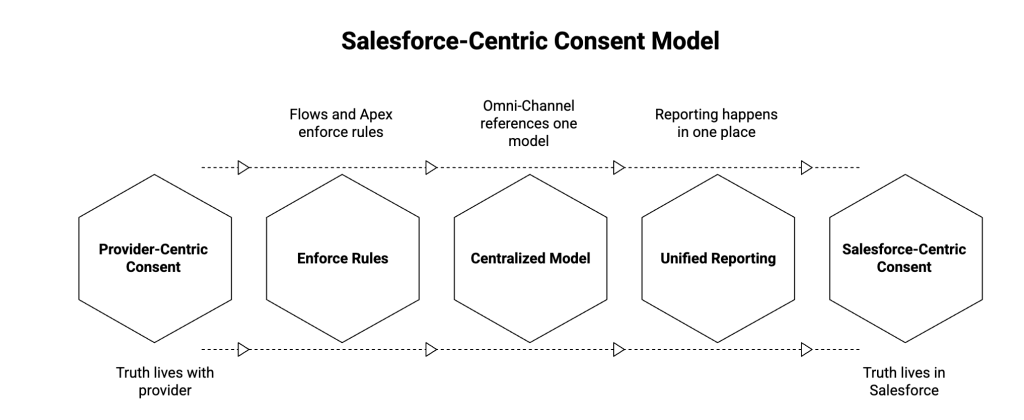
There are two options:
- Provider-centric consent You treat Twilio / Meta / your messaging vendor as the source of truth and periodically sync flags back into Salesforce.
- Salesforce-centric consent You treat Salesforce as the system of record for consent and enforce it at the platform level (Flows, validation, message send logic).
In a Salesforce-first architecture, the second option is the only one that scales:
- Flows and Apex can enforce rules before any callout is made to a provider.
- Omni-Channel, Cases, Campaigns, and Journeys can all reference one model.
- Reporting and audits happen in one place, not across three dashboards.
Salesforce’s ContactPointConsent object is designed for exactly this: to model consent independently of individual phone/email fields, in a way that is channel-aware and auditable.
You don’t need an elaborate data warehouse. You need one clean pattern that every messaging app in your org respects.
A practical ContactPointConsent model for WhatsApp & SMS
This is a minimal, working model that most orgs can implement without changing their entire data model.
1. Define where consent lives
We’ll use:
- ContactPointConsent: as the canonical record of consent
- Contact / Lead: as the “surface” where users see and change preferences
- Messaging app (e.g., ValueText): as the enforcer
At a high level:
- Each person can have multiple consent records (SMS, WhatsApp, Email).
- Consent is channel-specific, not just “contactable vs not contactable”.
- Flows use ContactPointConsent to decide whether a message can be sent.
2. Core fields you actually need
On ContactPointConsent, focus on a small, consistent set:
- Party (Who): Contact / Lead / Person Account
- Channel (What): SMS / WhatsApp / Email
- You can drive this with a picklist or a custom “Channel” field if you want clearer semantics.
- Status : Opted In / Opted Out / Unknown
- Source : Web Form / Agent / Campaign / System Import
- Legal Basis / Notes (optional) : for regulated industries
- Effective From / Effective To : when consent started/ended
You don’t have to expose every field to end users. What matters is that every opt-in/opt-out event creates or updates a record here.
3. Surfacing consent on Contact and Lead
Admins and agents should not have to navigate to related lists for basic decisions.
On Contact and Lead, add read-only formula fields or compact layout items such as:
SMS_Consent_Status_cWhatsApp_Consent_Status_cLast_Consent_Update_c
Each formula looks up the most recent ContactPointConsent for that channel.
This gives you:
- A simple way to filter List Views: “WhatsApp Opt-In = True”.
- A clear visual indicator on the record.
- A way to report on consent coverage by segment.
4. Capturing consent events
There are three main entry points:
- Web forms / Experience Cloud / Marketing forms
- Create or update ContactPointConsent when the form is submitted.
- Set Channel = SMS or WhatsApp based on the feature the form describes.
- Stamp Source = “Web Form” + the form name.
- Inbound keywords (e.g., “START”, “STOP”)
- Your messaging app receives an inbound message.
- It raises a Platform Event or invokes a Flow / Apex.
- That logic:
- Normalizes the keyword (START / STOP / YES / NO).
- Finds the right Contact / Lead based on the sender phone.
- Upserts a ContactPointConsent record with updated Status and timestamp.
- Agent actions (checkboxes, quick actions)
- Provide a Quick Action on Contact / Lead: “Update Messaging Consent”.
- The action writes to ContactPointConsent via Flow.
- It should never directly toggle a checkbox without creating an audit record.
The pattern is simple: no one updates a consent flag directly. They always go through a path that results in a ContactPointConsent record.
5. Enforcing consent before any message is sent
This is where most orgs fall short.
Instead of “hoping” that templates and good intentions are enough, bake consent checks into your automation:
- For Flow-based messaging:
- Add a subflow called “Check Messaging Consent”.
- Inputs: Contact/Lead Id, Channel (SMS/WhatsApp).
- Logic:
- Query the latest ContactPointConsent for that person and channel.
- If Status is Opted Out or Unknown → do not send, optionally log an attempt.
- If Status is Opted In and within Effective From/To → proceed.
- For button-initiated messaging from record pages:
- Use a screen flow or LWC → Apex → Flow pattern.
- Check consent before you call any messaging API.
- Surface a clear message to the agent if consent is missing or revoked.
- For bulk sends from reports/list views:
- Your messaging provider should internally call a consent check routine per record.
- Fail closed: if consent cannot be determined, skip the record and log why.
The key principle: Salesforce holds the rules, not the provider.
6. Reporting and audits
Once ContactPointConsent is your source of truth, reporting becomes straightforward:

- Consent Coverage
- % of Contacts with SMS Opt-In
- % of Contacts with WhatsApp Opt-In
- By region, segment, lifecycle stage
- Consent Velocity
- New opt-ins per week / month
- Opt-outs per week / month
- Blocked Sends
- By channel, by campaign, by owner of messages prevented by consent checks
When Legal or Compliance asks “show me our opt-in trail for this number,” you can do it entirely from Salesforce.
Where ValueText fits in
Once you have a Salesforce-centric consent model, you need a messaging app that will respect it.
A native app like ValueText can:
- Read from ContactPointConsent directly before sending WhatsApp or SMS.
- Use Flows and subflows you already have to enforce quiet hours and region rules.
- Write every inbound “START/STOP” back into Salesforce as ContactPointConsent events.
- Keep all message history and consent decisions on standard or custom objects inside Salesforce, not in an external portal.
You’re not relying on a provider’s opaque “opt-out list.” You’re running a Salesforce pattern that any Admin or Architect can review, extend, or migrate.
If you want a practical walkthrough of how to:
- model ContactPointConsent,
- wire it to WhatsApp/SMS,
- and enforce it in Flow before any message goes out,
The ValueText team can walk you through a reference architecture in 15 minutes 👉 [Book a call].
👉 Visit us on the Salesforce AppExchange
Author : Nikhil – Senior Client Consultant, ValueText
Nikhil leads global marketing and Salesforce integration initiatives for ValueText’s SaaS messaging platform. He writes high-impact blogs, guides new users through onboarding and training, and drives adoption of SMS / WhatsApp automation across industries. Passionate about the crossroads of marketing, technology, and client success.
Other useful articles
Learn how to improve customer communication in Salesforce