05 Feb
If your customers speak more than one language, language should not be “something agents figure out.” It should be part of the workflow. Otherwise, you end up with slow handoffs, inconsistent replies, and customers repeating themselves.
This pattern is a simple way to handle multilingual message templates and route conversations to the right team based on language, using Salesforce as the place where decisions and history live.
Where multilingual support quietly falls apart
Even strong teams run into the same issues:
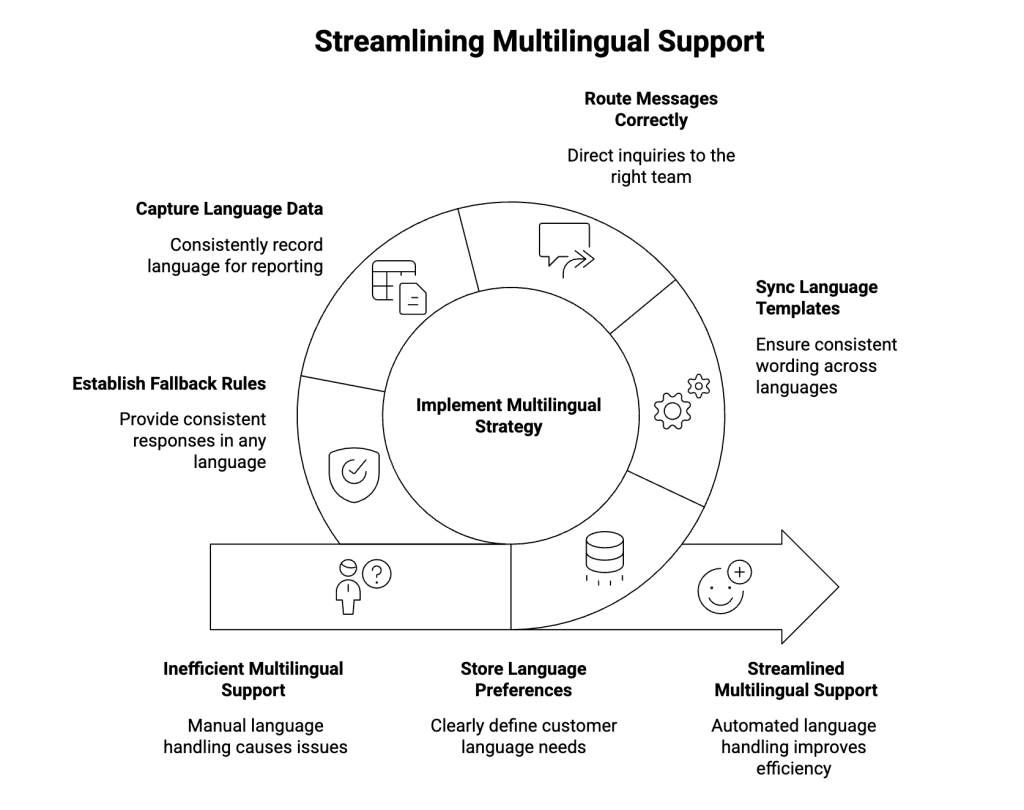
- No clear language preference stored anywhere, so agents guess.
- Different wording per language because templates aren’t kept in sync.
- Replies land with the wrong team, so people forward messages around.
- No clean reporting, because language isn’t captured consistently.
- No fallback rule, so customers get mixed-language responses or long delays.
As a result, language becomes manual work, even when you have the right people.
The simple principle: treat language like a data point
The fix isn’t complicated. Make language visible and consistent in Salesforce.
In practice:
- Store the customer’s preferred language on their record (when you know it).
- Store the conversation language on the work record (often a Case), so everyone sees it.
- Use one template set per language so messages stay consistent.
- Route the work to the right team using queues (or skills if you use them).
Therefore, Salesforce drives the process, not agent memory.
The pattern in 3 parts
1) Decide where language comes from
Pick one “main source,” and define a fallback.
A clean approach:
- Customer preferred language (best when you have it)
- If missing, use the language already set on the Case/conversation
- If still missing, use your default language and mark it as “unknown”
Also, keep one rule: don’t keep changing the language back and forth. If it’s unknown, route to a place that can confirm it once.
2) Keep templates grouped and consistent
Think in “message moments,” then translate each moment.
A small template set is usually enough:
- First reply / acknowledgment
- Ask for more details
- Update / next step
- Resolution / confirmation
- Closing message
- Stop/opt-out confirmation
To keep it controlled:
- Keep one standard meaning for each message moment
- Maintain one version per language under that same moment
- When you change policy text in one language, update the others
This avoids “Spanish version says X, English version says Y” problems that create complaints later.
3) Route by language in a predictable way
You can do this two ways. Keep it simple and pick one.
Option A: Queues by language (easy to run)
- “Support – English”
- “Support – Spanish”
- “Support – French”
- “Support – Language Triage” (when unknown)
Salesforce assigns the case based on the language field. If the language is missing, it goes to the triage queue.
Option B: Skills by language (useful when you have large teams)
If you already route work by skills, add language as a skill and route accordingly. If no one is available, send it to a fallback queue.
In either approach, define a fallback. That’s what prevents work from getting stuck.
The automation should stay readable
Keep the logic short so admins can maintain it.
When a new message comes in (or a new case is created):
- Set the language
- Use customer preferred language if available
- Otherwise keep the case’s existing language
- Otherwise default and mark “needs confirmation”
- Assign the right team
- If language is known → send to the matching language queue
- If unknown → send to “Language Triage”
- Pick the right template
- Choose the template that matches the case language
- If language is unknown, use the default once and ask: “Which language do you prefer?”
As a result, agents stop doing language admin work and focus on resolution.
Reporting becomes useful (without extra effort)
Once language is stored in a consistent way, you can answer simple questions:
- How many conversations per language this week?
- Which language queues have the biggest backlog?
- Are response times slower in a specific language?
- How often do cases get reassigned because of language?
Meanwhile, these numbers also tell you where you need staffing coverage.
Implementation note
If you want to run this pattern for WhatsApp/SMS inside Salesforce, ValueText can provide the messaging layer while Salesforce continues to control:
- who gets the message
- which language template is used
- which team receives replies
- and where the conversation history is stored
You can review ValueText on AppExchange if you need WhatsApp/SMS messaging that stays linked to Salesforce records. AppExchange Link
👉🏻 Get a checklist for multilingual templates and language-based routing in Salesforce.
Author : Nikhil – Senior Client Consultant, ValueText
I lead global marketing and Salesforce integration initiatives for ValueText’s SaaS messaging platform. I writes high-impact blogs, guides new users through onboarding and training, and drives adoption of SMS / WhatsApp automation across industries. Passionate about the crossroads of marketing, technology, and client success.
Other useful articles
Learn how to improve customer communication in Salesforce