28 Jan
If you manage payments in Salesforce, the real risk isn’t forgetting to send reminders. It’s sending the right message, to the right person, at the right time, and still being able to prove what happened later.
This pattern shows a simple way to handle:
- Payment confirmations (right after money is received)
- Payment-plan reminders (before and after a due date)
…while keeping everything tied to Salesforce records so Finance and Support aren’t chasing information across tools.
This pattern is a practical, admin-owned way to handle payment confirmations and gentle payment-plan reminders using Salesforce objects and Flow, while keeping reporting and compliance straightforward.
What usually breaks (even in mature orgs)
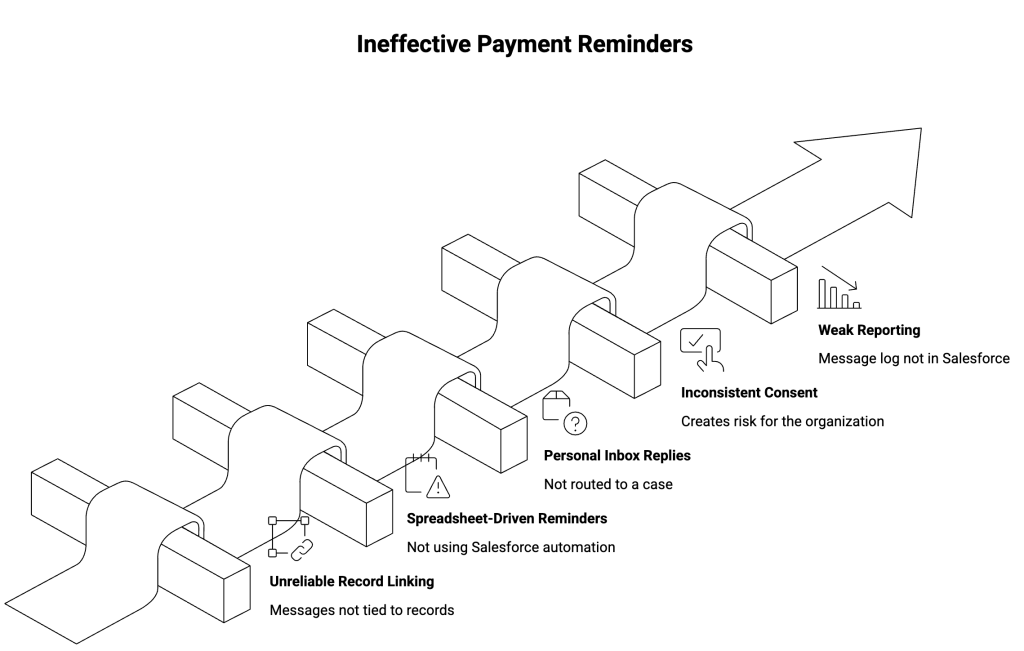
Most teams try WhatsApp/SMS reminders and run into the same problems:
- Messages aren’t linked to the correct Salesforce record (invoice, booking, order, etc.), so teams can’t trace what was sent.
- Reminder timing is managed outside Salesforce (spreadsheets, calendars, manual lists), which creates gaps.
- Replies go to personal inboxes, not to a tracked work item, so follow-ups are missed.
- Customer consent and opt-outs aren’t handled consistently, which creates compliance risk.
- Reporting is weak because the message history isn’t stored in Salesforce.
As a result, reminders become “extra noise” instead of a controlled process.
The core idea: keep the process in Salesforce
A reliable setup uses Salesforce as the source of truth:
- A change in Salesforce triggers the message (for example, “Payment received” or “Due date approaching”).
- Salesforce automation decides who to message and what to send.
- The message is logged back to the related record, so anyone can see it later.
- Replies are handled like normal work routed to the right team with context.
Therefore, you reduce manual follow-up and improve traceability without building a second system.
The pattern: two simple automations
You’re solving two moments. Keep them separate, but consistent.
1) Payment confirmation (immediate)
Trigger: When a payment is marked as received in Salesforce.
What it does:
- Finds the right customer contact linked to that payment or invoice
- Sends a short confirmation on WhatsApp or SMS
- Saves a copy of the message and delivery status back to Salesforce
Why it matters:
If a customer disputes a payment later, your team can open the record and see exactly what was confirmed and when.
2) Payment-plan reminders (scheduled and gentle)
Trigger: A scheduled Salesforce automation that checks what’s due and what’s overdue.
A simple sequence that avoids spamming:
- A few days before the due date: friendly reminder with amount and due date
- The day before: quick nudge
- The day after (if unpaid): polite overdue note + “reply if you need to reschedule”
- Only if needed: create a tracked follow-up for your team (for example, a Case)
To prevent repeated messages when dates change, add a simple rule: don’t send another reminder if one was sent recently.
Replies and exceptions: don’t let messages disappear
This is where reminders usually fail.
When customers reply with questions like:
- “Can I change the date?”
- “I already paid, please check.”
- “Stop messaging me.”
…those replies should not end up in someone’s personal WhatsApp inbox.
Instead, route them to a tracked record in Salesforce (commonly a Case or a similar work item) so the right team can respond with context.
Basic guardrails to keep it safe
Even a simple reminder setup needs guardrails:
- Check customer permission to message before sending
- Honor opt-outs immediately and stop future reminders
- Avoid sending at odd hours based on your business rules
- Log the message (content/template, time sent, delivery status, and the related invoice/payment record)
This keeps customer communication consistent and makes audits far easier.
Reporting becomes straightforward
Once messages are logged on Salesforce records, reporting doesn’t require guesswork. For example, you can track:
- How many confirmations were sent successfully
- How many reminders went out per stage (before due date, overdue)
- How often customers reply and why
- How many follow-ups were created for the team
In contrast, when the message history lives outside Salesforce, these reports become manual reconciliation.
Implementation note
If you want to run this pattern with WhatsApp and SMS inside Salesforce, ValueText can provide the sending and logging layer while Salesforce automation controls the timing and rules.
You can review ValueText on AppExchange if you need WhatsApp/SMS messaging that stays tied to Salesforce records. AppExchange Link
👉🏻 Get a checklist for setting up payment confirmations and reminders in Salesforce
Author : Nikhil – Senior Client Consultant, ValueText
I lead global marketing and Salesforce integration initiatives for ValueText’s SaaS messaging platform. I writes high-impact blogs, guides new users through onboarding and training, and drives adoption of SMS / WhatsApp automation across industries. Passionate about the crossroads of marketing, technology, and client success.
Other useful articles
Learn how to improve customer communication in Salesforce