07 Jan
In most Salesforce orgs I work with, “slow speed-to-lead” is blamed on SDR discipline.
In reality, the first delay usually happens before a human touches the record: nothing automatic fires when a Lead is created.
This pattern solves one very specific task:
When a new Lead is created in Salesforce, send a WhatsApp/SMS auto-reply immediately and create a follow-up Task for the SDR, with everything logged on the Lead.
It assumes you already have a basic consent and guardrail layer in place (for example, ContactPointConsent plus a shared “Can we send this?” subflow).
If you’re not a Salesforce Admin and the setup below feels too technical, don’t worry, our team can guide you through the automation step by step.
Step 1: Confirm the right fields on Lead
Before building any Flow, make sure the Lead object can support the workflow. Otherwise, you’ll end up compensating with workarounds later.
You’ll want:
- A messaging-capable phone field
MobilePhoneor a dedicatedWhatsApp_Number_c.
- A way to infer region or time rules
Countryor a normalizedRegion_c.
Next, add two simple tracking fields:
First_Auto_Reply_Sent_At_c(Date/Time)First_Response_Channel_c(Picklist: WhatsApp, SMS)
These fields will allow you to report on speed-to-lead before and after you roll out the automation.
Step 2: Standardize the first reply message
Your SDRs should not invent their own “thanks for your interest” copy. Instead, define one version and keep it inside your native Salesforce messaging app (for example, ValueText).
Create a WhatsApp template such as:
“Hi {{FirstName}}, thanks for reaching out.
We’ve received your details and will follow up shortly.
You can reply here if you want to add more information.”
And, if you also use SMS, define:
“Hi {{FirstName}}, thanks for contacting us.
We’ve received your request and will be in touch soon.
Reply to this message if you’d like to add anything.”
Because these templates live in one place, legal and compliance can review them once, and every auto-reply remains consistent.
Step 3: Build the Lead-triggered Flow
Now you can move into Flow Builder and wire the behavior end-to-end.
3.1 Create the Flow and limit when it fires
Create a Record-Triggered Flow:
- Object: Lead
- Trigger: When a record is created
- Run: After Save
Set entry conditions so you only trigger for real inbound leads:
IsConverted == FalseMobilePhone != null OR WhatsApp_Number_c != nullLeadSource IN ('Web Form', 'Landing Page', 'Paid Ads', 'Chatbot')
This avoids sending auto-replies for imports, old lists, or data cleanup.
3.2 Call the guardrail subflow
Next, add a Subflow element that calls your shared guardrail logic:
- Subflow:
Messaging_Guardrails_Check - Inputs:
RecordId = $Record.IdChannel = 'WhatsApp'(orSMS)MessageType = 'Transactional'Regionfrom Lead country/regionPlannedSendDateTime = $Flow.CurrentDateTime
The subflow should return:
CanSend(Boolean)ReasonCode(Text)
Add a Decision step:
- If
CanSend == False→ optionally logReasonCodeand end the Flow. - If
CanSend == True→ proceed to send the message.
This keeps speed-to-lead aligned with the same consent, DNC, and quiet-hours rules you use everywhere else.
3.3 Send the WhatsApp/SMS auto-reply
Add an Action element that calls the ValueText invocable:
- Inputs:
- Lead Id
- Channel (WhatsApp or SMS)
- Template Id / Name
- Template variables (FirstName, etc.)
The action should both send the message and log it in Salesforce on the appropriate conversation or message object linked to the Lead.
3.4 Stamp tracking fields on the Lead
After the action, add an Update Records element to update the same Lead:
First_Auto_Reply_Sent_At_c = $Flow.CurrentDateTimeFirst_Response_Channel_c = 'WhatsApp'(or SMS)
From this point onward, speed-to-lead is measurable with a simple formula in a report.
3.5 Create a follow-up Task for the SDR
Finally, create a Task so a human follow-up is guaranteed:
- Subject: “Follow up: new inbound Lead (auto-reply sent)”
- WhoId: Lead Id
- OwnerId: Lead Owner or an SDR queue
- Due Date: Today or Tomorrow
- Status: Not Started
- Priority: your standard (for example, High for web leads)
Now the automation matches the original use case:
A new Lead triggers a welcome message and a follow-up Task without SDRs needing to watch a list view.
Step 4: Run a quick end-to-end test
Before you roll this into production, run a simple test path in a sandbox.
- Create a Lead that should qualify:
- Valid mobile or WhatsApp number
LeadSource = Web Form
- Verify:
- WhatsApp/SMS is sent
- The conversation is logged on the Lead
First_Auto_Reply_Sent_At_candFirst_Response_Channel_care populated- A Task is created and correctly assigned
Then create a Lead that should not qualify (for example, no phone, or different LeadSource) and confirm that nothing is sent.
Common errors and how to avoid them
Even with a simple pattern, a few mistakes repeat across orgs:
- Auto-replies firing on bulk imports
- Tighten Flow entry conditions. Limit to real-time sources such as forms or ads.
- Messages sent without proper consent
- Ensure every messaging Flow calls the same guardrail subflow. Do not create special cases that bypass it.
- SDRs still using personal phones
- Make sure the Lead page or console workspace exposes the conversation component, so they can reply from Salesforce directly.
- No visibility on improvement
- Build a basic report:
First_Auto_Reply_Sent_At_c - CreatedDate- Group by LeadSource and Channel
- Compare before/after rollout.
- Build a basic report:
Where ValueText fits, and how to get help
In this design, Salesforce owns the logic:
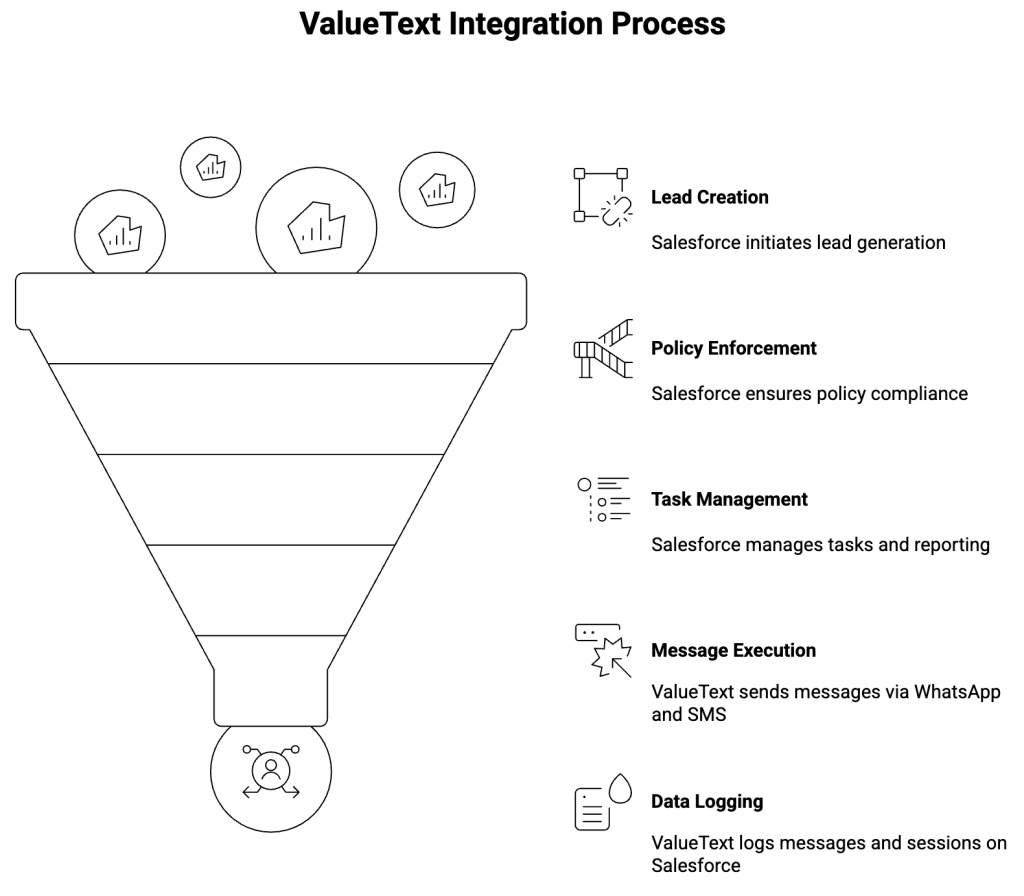
- Lead creation
- Guardrails and policies
- Tasks and reporting
A native messaging app like ValueText simply executes those decisions:
- It exposes Flow-friendly actions for WhatsApp and SMS.
- It logs all messages and sessions on Salesforce records.
- It works with your existing consent and governance model.
If you’d like a concrete reference implementation (Flow export, field list, and guardrail structure) for this new-lead auto-reply pattern, the ValueText team can share a working setup focused on architecture and configuration.
https://valuetext.io/request-a-demo/
For teams that prefer a native Salesforce implementation of this approach, ValueText is available on AppExchange: AppExchange Link
Author : Nikhil – Senior Client Consultant, ValueText
I lead global marketing and Salesforce integration initiatives for ValueText’s SaaS messaging platform. I writes high-impact blogs, guides new users through onboarding and training, and drives adoption of SMS / WhatsApp automation across industries. Passionate about the crossroads of marketing, technology, and client success.
Other useful articles
Learn how to improve customer communication in Salesforce