
ValueText ValueText
Pricing
Start free trial Talk to us→
Free trial setup

Set up ValueText inside Salesforce.

Install the package, configure your country, select your channel, enable OAuth, and add the Mini Chat Console to your record pages. Everything happens inside Salesforce, nothing external.

7 steps · 15 minutes Get setup help→
  1. 01
    Step 01 · Install

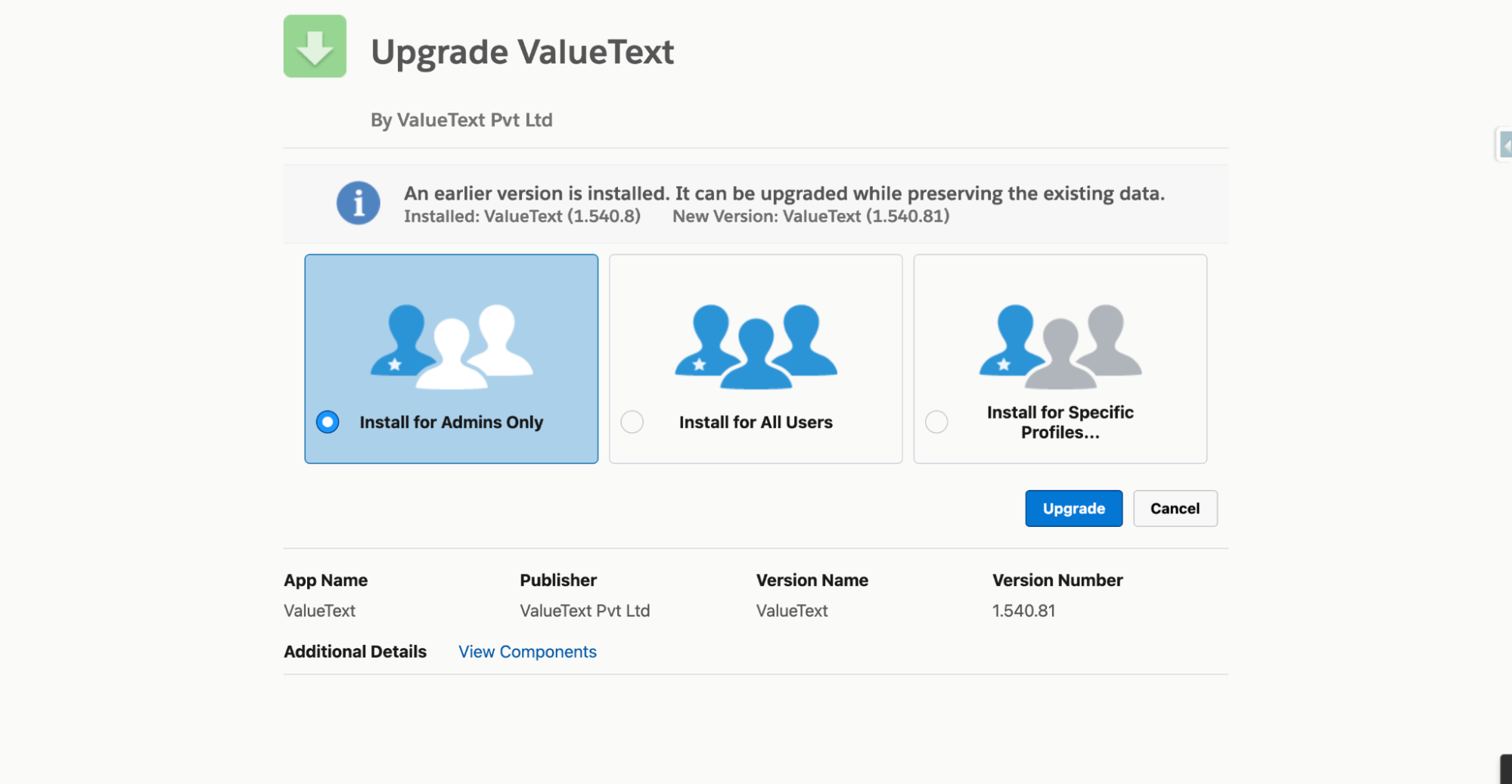
    Install the ValueText package

    Install the managed package for your Salesforce org. Choose the correct installation option and wait for the confirmation email from Salesforce.

    Installation usually takes 5 to 10 minutes.

    Install in production↗Install in sandbox↗
    Salesforce package installer screen titled Upgrade ValueText, showing Install for Admins Only selected alongside Install for All Users and Install for Specific Profiles, with an Upgrade button.
  2. 02
    Step 02 · Open

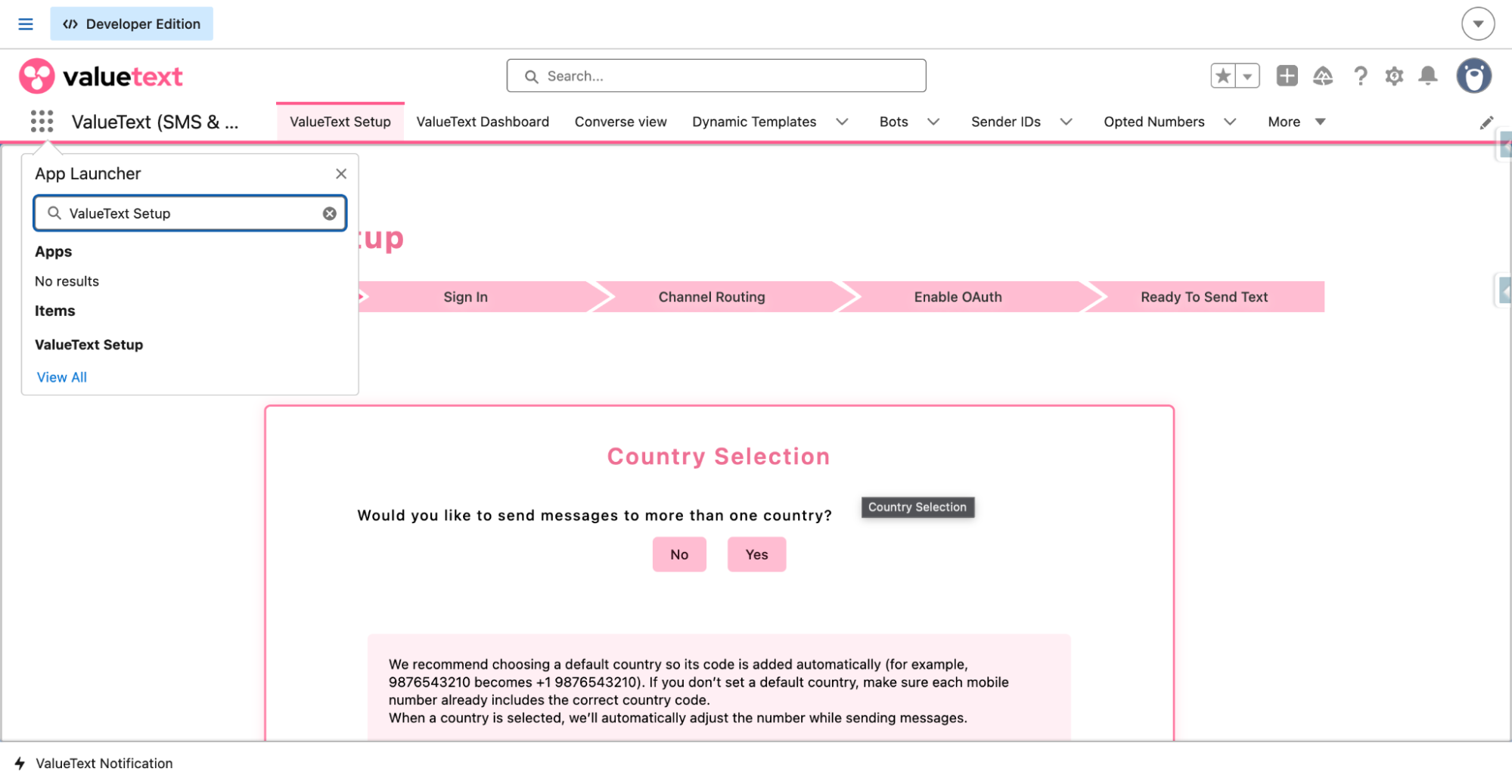
    Open ValueText Setup

    Open the App Launcher, search for ValueText, and open ValueText Setup from the list.

    Salesforce App Launcher with "ValueText Setup" typed into the search box and ValueText Setup listed under Items.
  3. 03
    Step 03 · Country

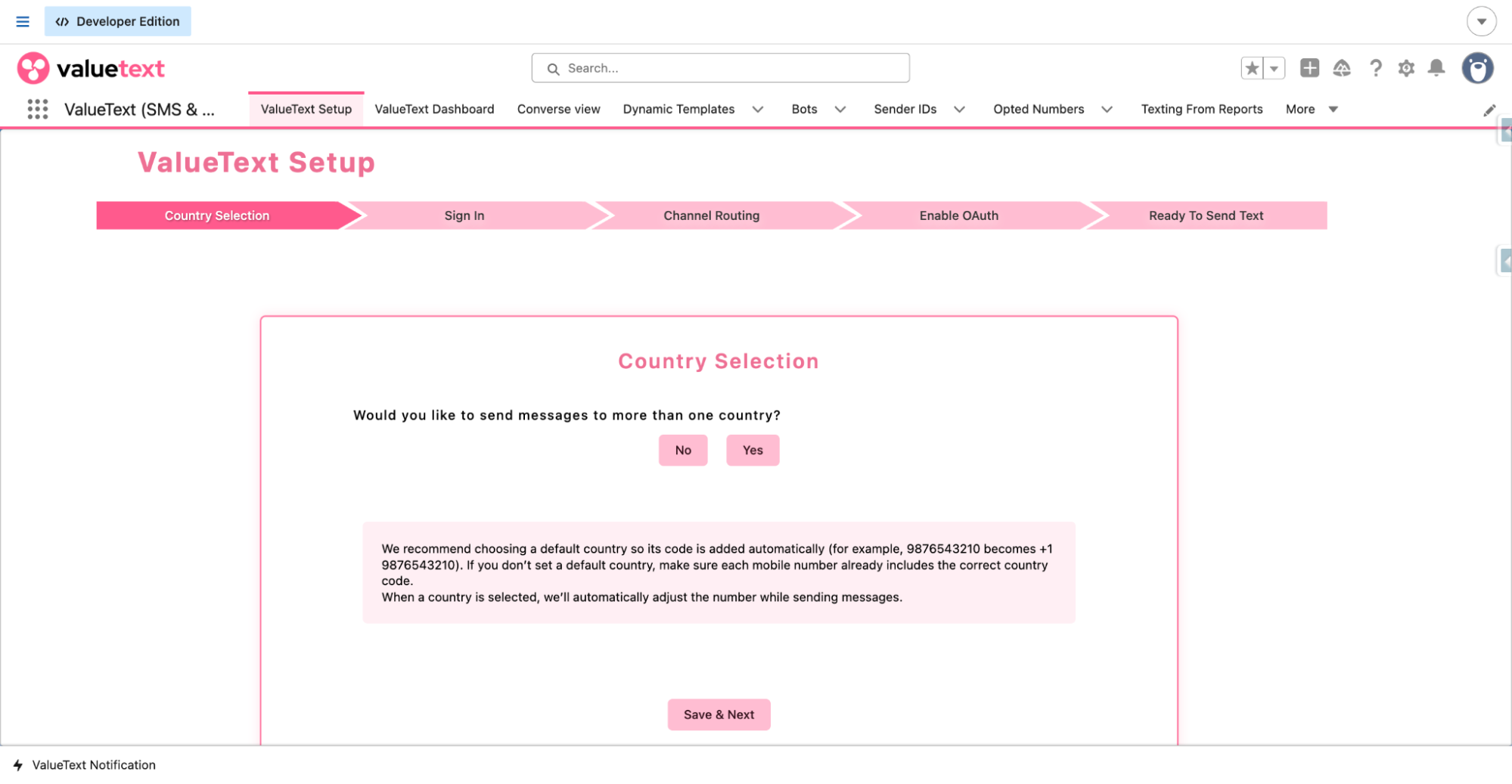
    Select your sending country

    Choose whether you want to send messages from a single country or enable multi-country messaging.

    You can update this setting at any time.

    ValueText Setup wizard on the Country Selection step, asking whether to send messages to more than one country, with No and Yes buttons and a Save & Next button.
  4. 04
    Step 04 · Account

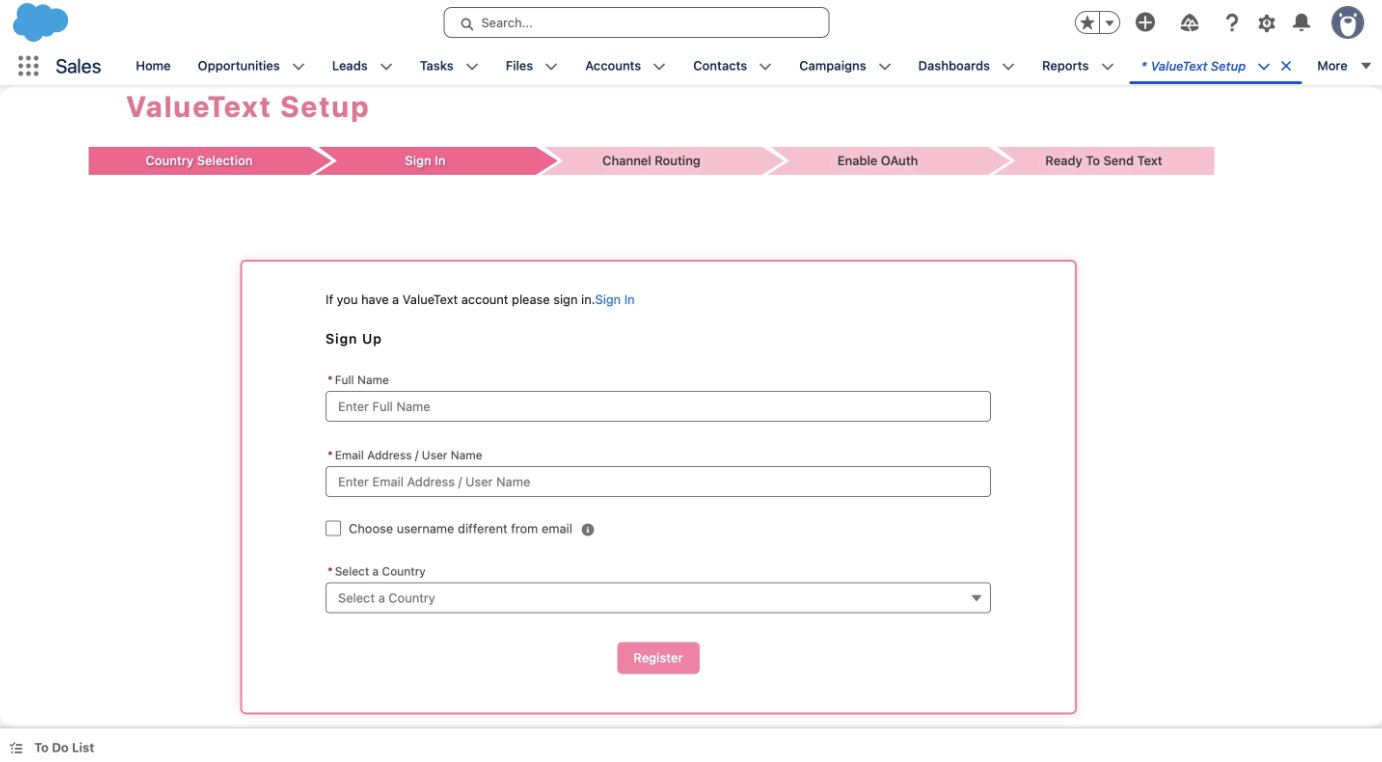
    Create your ValueText account

    Enter your name, email, and country to register. You will receive an OTP by email, then set your password.

    Your password must include an uppercase letter, a lowercase letter, a number, a special character, and be at least eight characters.

    ValueText Setup wizard on the Sign In step, showing the Sign Up form with Full Name, Email Address / User Name, and Select a Country fields and a Register button.
  5. 05
    Step 05 · Channel

    Choose your default channel

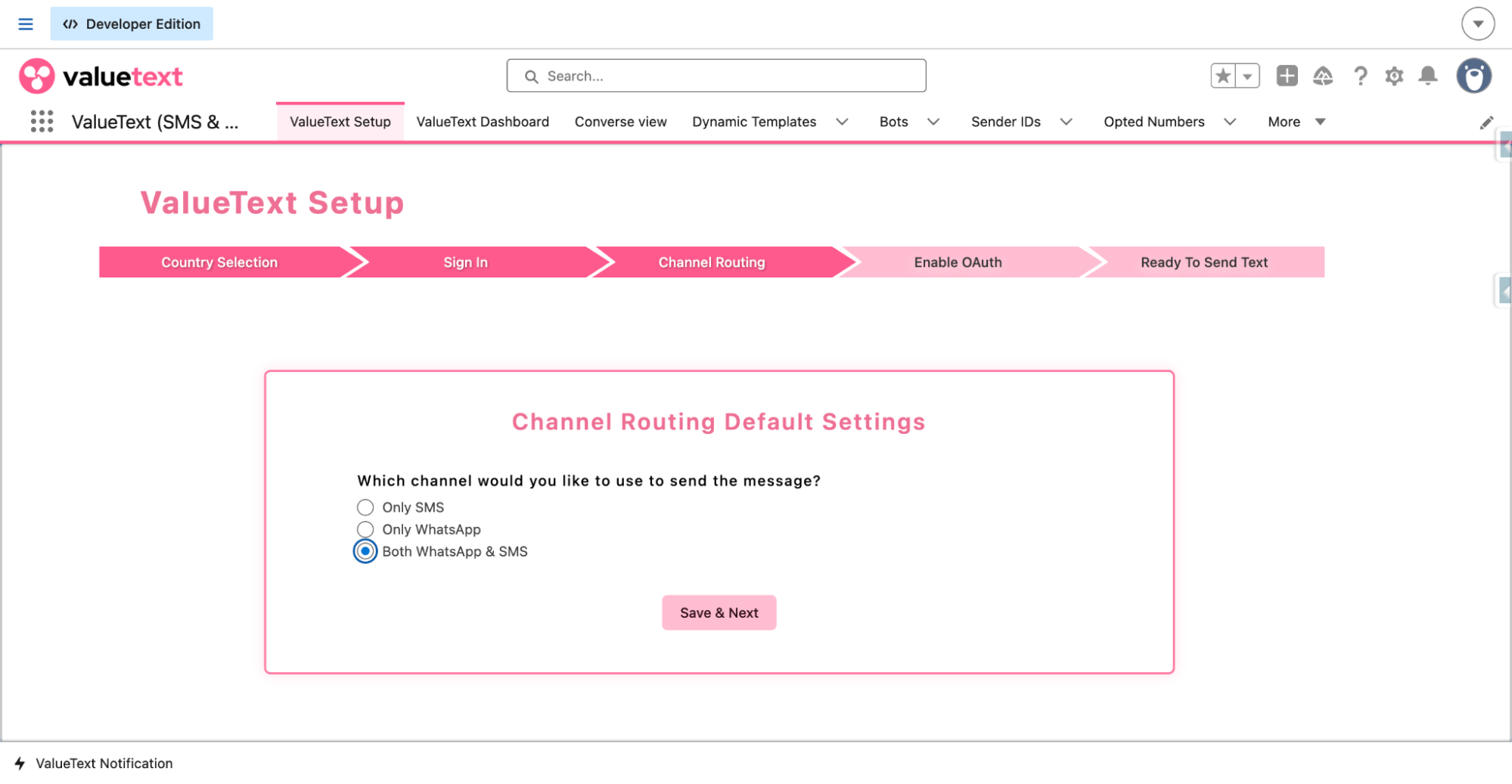
    Select SMS, WhatsApp, or both. This defines your default messaging behavior inside Salesforce.

    ValueText Setup wizard on the Channel Routing step, showing radio options for Only SMS, Only WhatsApp, and Both WhatsApp & SMS.
  6. 06
    Step 06 · OAuth

    Enable OAuth

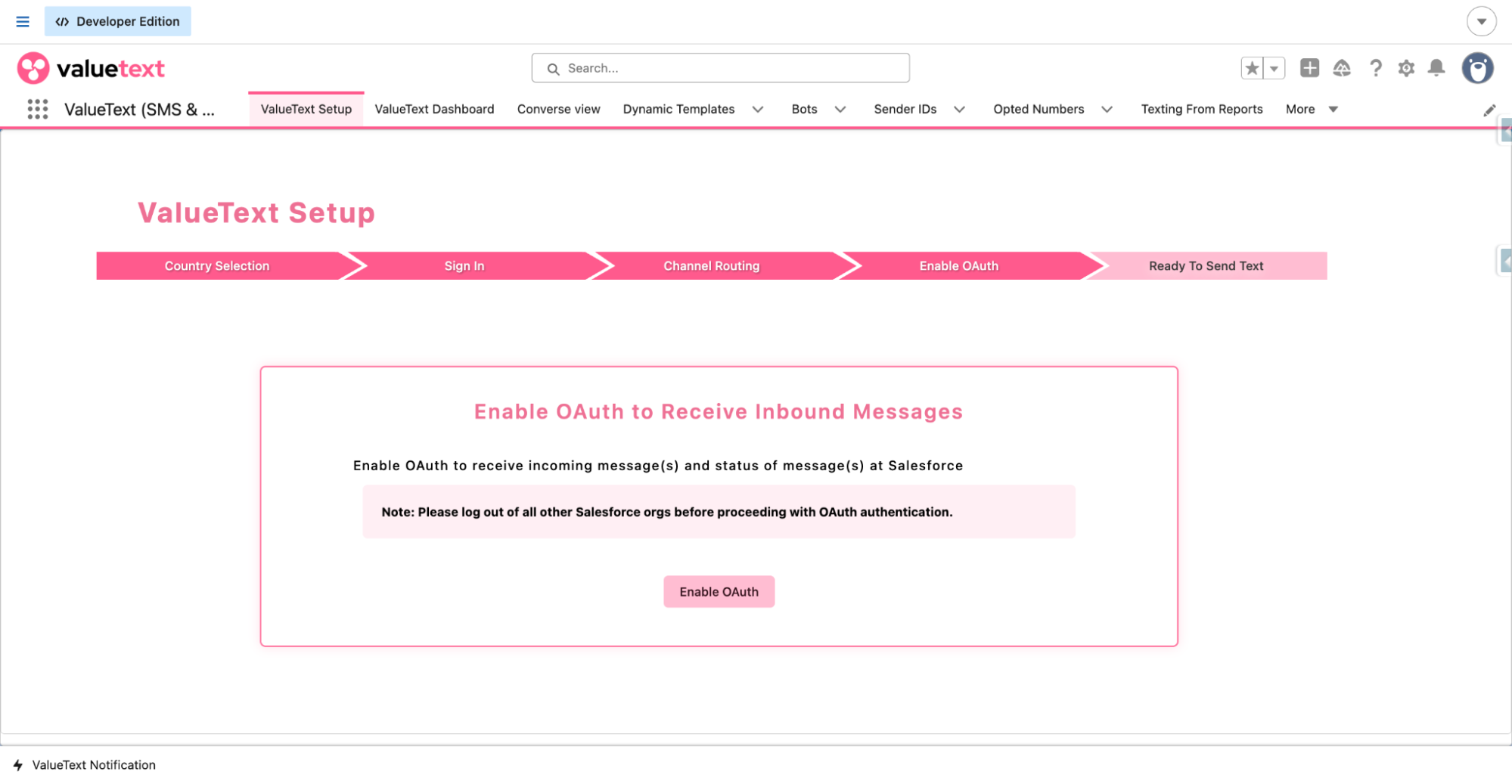
    Click Enable OAuth, log in when prompted, and allow access so ValueText can receive inbound messages securely inside Salesforce.

    ValueText Setup wizard on the Enable OAuth step, with an Enable OAuth button and a note to log out of all other Salesforce orgs before authenticating.
  7. 07
    Step 07 · Console

    Add the Mini Chat Console

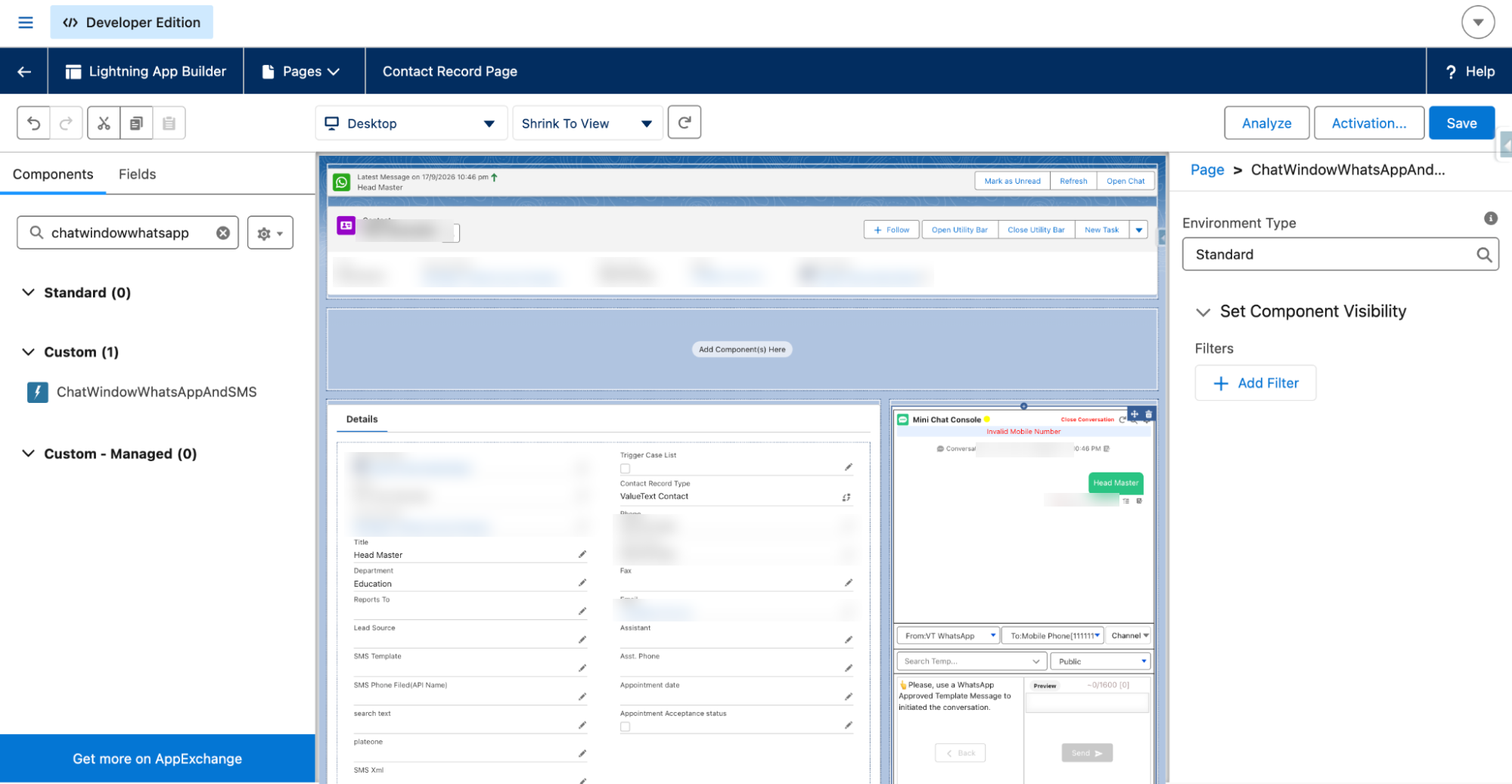
    Open any record, click the gear icon, select Edit Page, search for Chat Window WhatsApp and SMS, and drag it into the layout.

    You can add the console to Leads, Contacts, Accounts, Opportunities, and custom objects.

    Lightning App Builder editing a Contact record page, with the ChatWindowWhatsAppAndSMS component (Mini Chat Console) placed in the layout beside the record's related list.

Need help?

Book a call and we set ValueText up in your own Salesforce org with you on the line. The setup itself takes 15 minutes.

Book a quick setup call→
ValueText ValueText
Salesforce Available onAppExchange
What we do

ValueText is SMS and WhatsApp inside the CRM your team already runs, Salesforce or Zoho CRM. Every conversation lands on your own records, not in a vendor inbox.

Get an AI summary of ValueText

Ask the engine you trust to brief you on ValueText.

Product ValueText for Salesforce Salesforce SMS Salesforce WhatsApp Salesforce SMS integration Pricing
Resources Docs FAQ Blog Changelog Best Salesforce SMS apps, 2026 WhatsApp pricing changes, October 2026
Other CRMs ValueText for Zoho CRM ValueText for HubSpot
Company About us Contact us Affiliate program WhatsApp onboarding
Legal Terms of service Privacy policy Data processing addendum Cookie policy Security Sub-processors Log in Cookie preferences
© 2026 ValueText. All rights reserved. Your CRM. Your records. Your conversations.
ValueText
ValueTextValueText

Get the guide and learn ValueText by email.

  • The setup guide, now7 steps to set up ValueText inside Salesforce.
  • How it worksSMS and WhatsApp from your records, templates and Mini Chat Console.
  • Use casesHow teams run speed-to-lead, payment reminders and drip campaigns.
  • Features people missAutomation, bulk sends and reporting.
  • The setup guide, now
  • How ValueText works
  • Use cases and features

Rated 4.98 stars across 131 AppExchange reviews for ValueText, the Salesforce-native messaging platform.

Setup guide + email course

Share your details.

We will email you how ValueText works. Unsubscribe in one click. Privacy policy

Free trial setup

Set up ValueText inside Salesforce.

Install the package, configure your country, select your channel, enable OAuth, and add the Mini Chat Console to your record pages. Everything happens inside Salesforce, nothing external.

7 steps · 15 minutes Get setup help→
  1. 01
    Step 01 · Install

    Install the ValueText package

    Install the managed package for your Salesforce org. Choose the correct installation option and wait for the confirmation email from Salesforce.

    Installation usually takes 5 to 10 minutes.

    Install in production↗Install in sandbox↗
    Salesforce package installer screen titled Upgrade ValueText, showing Install for Admins Only selected alongside Install for All Users and Install for Specific Profiles, with an Upgrade button.
  2. 02
    Step 02 · Open

    Open ValueText Setup

    Open the App Launcher, search for ValueText, and open ValueText Setup from the list.

    Salesforce App Launcher with "ValueText Setup" typed into the search box and ValueText Setup listed under Items.
  3. 03
    Step 03 · Country

    Select your sending country

    Choose whether you want to send messages from a single country or enable multi-country messaging.

    You can update this setting at any time.

    ValueText Setup wizard on the Country Selection step, asking whether to send messages to more than one country, with No and Yes buttons and a Save & Next button.
  4. 04
    Step 04 · Account

    Create your ValueText account

    Enter your name, email, and country to register. You will receive an OTP by email, then set your password.

    Your password must include an uppercase letter, a lowercase letter, a number, a special character, and be at least eight characters.

    ValueText Setup wizard on the Sign In step, showing the Sign Up form with Full Name, Email Address / User Name, and Select a Country fields and a Register button.
  5. 05
    Step 05 · Channel

    Choose your default channel

    Select SMS, WhatsApp, or both. This defines your default messaging behavior inside Salesforce.

    ValueText Setup wizard on the Channel Routing step, showing radio options for Only SMS, Only WhatsApp, and Both WhatsApp & SMS.
  6. 06
    Step 06 · OAuth

    Enable OAuth

    Click Enable OAuth, log in when prompted, and allow access so ValueText can receive inbound messages securely inside Salesforce.

    ValueText Setup wizard on the Enable OAuth step, with an Enable OAuth button and a note to log out of all other Salesforce orgs before authenticating.
  7. 07
    Step 07 · Console

    Add the Mini Chat Console

    Open any record, click the gear icon, select Edit Page, search for Chat Window WhatsApp and SMS, and drag it into the layout.

    You can add the console to Leads, Contacts, Accounts, Opportunities, and custom objects.

    Lightning App Builder editing a Contact record page, with the ChatWindowWhatsAppAndSMS component (Mini Chat Console) placed in the layout beside the record's related list.

Need help?

Book a call and we set ValueText up in your own Salesforce org with you on the line. The setup itself takes 15 minutes.

Book a quick setup call→
ValueText ValueText
Salesforce Available onAppExchange
What we do

ValueText is SMS and WhatsApp inside the CRM your team already runs, Salesforce or Zoho CRM. Every conversation lands on your own records, not in a vendor inbox.

Get an AI summary of ValueText

Ask the engine you trust to brief you on ValueText.

Product ValueText for Salesforce Salesforce SMS Salesforce WhatsApp Salesforce SMS integration Pricing
Resources Docs FAQ Blog Changelog Best Salesforce SMS apps, 2026 WhatsApp pricing changes, October 2026
Other CRMs ValueText for Zoho CRM ValueText for HubSpot
Company About us Contact us Affiliate program WhatsApp onboarding
Legal Terms of service Privacy policy Data processing addendum Cookie policy Security Sub-processors Log in Cookie preferences
© 2026 ValueText. All rights reserved. Your CRM. Your records. Your conversations.
ValueText
ValueTextValueText

Get the guide and learn ValueText by email.

  • The setup guide, now7 steps to set up ValueText inside Salesforce.
  • How it worksSMS and WhatsApp from your records, templates and Mini Chat Console.
  • Use casesHow teams run speed-to-lead, payment reminders and drip campaigns.
  • Features people missAutomation, bulk sends and reporting.
  • The setup guide, now
  • How ValueText works
  • Use cases and features

Rated 4.98 stars across 131 AppExchange reviews for ValueText, the Salesforce-native messaging platform.

Setup guide + email course

Share your details.

{{ a.gateEmailError }}

{{ a.gateCompanyError }}

{{ a.gateNetworkError }}

We will email you how ValueText works. Unsubscribe in one click. Privacy policy