




One record, every reply

Text from Salesforce. Every reply on the record.

SMS, WhatsApp and WebChat from the contact, lead or case your team already has open. The thread stays where the next person looks.

4.98 on Salesforce AppExchange
250+ Teams worldwide
8,000+ Users
200M Messages a year
190+ Countries covered
97.3% Delivery rate
Singlife
Fujifilm
Yamaha
Legrand
PCCW
UCSF
FieldCore
DiDi
What it does

Five ways your team uses text messaging in Salesforce.

No second app, no copying between tabs, and no reply lost in someone’s phone.

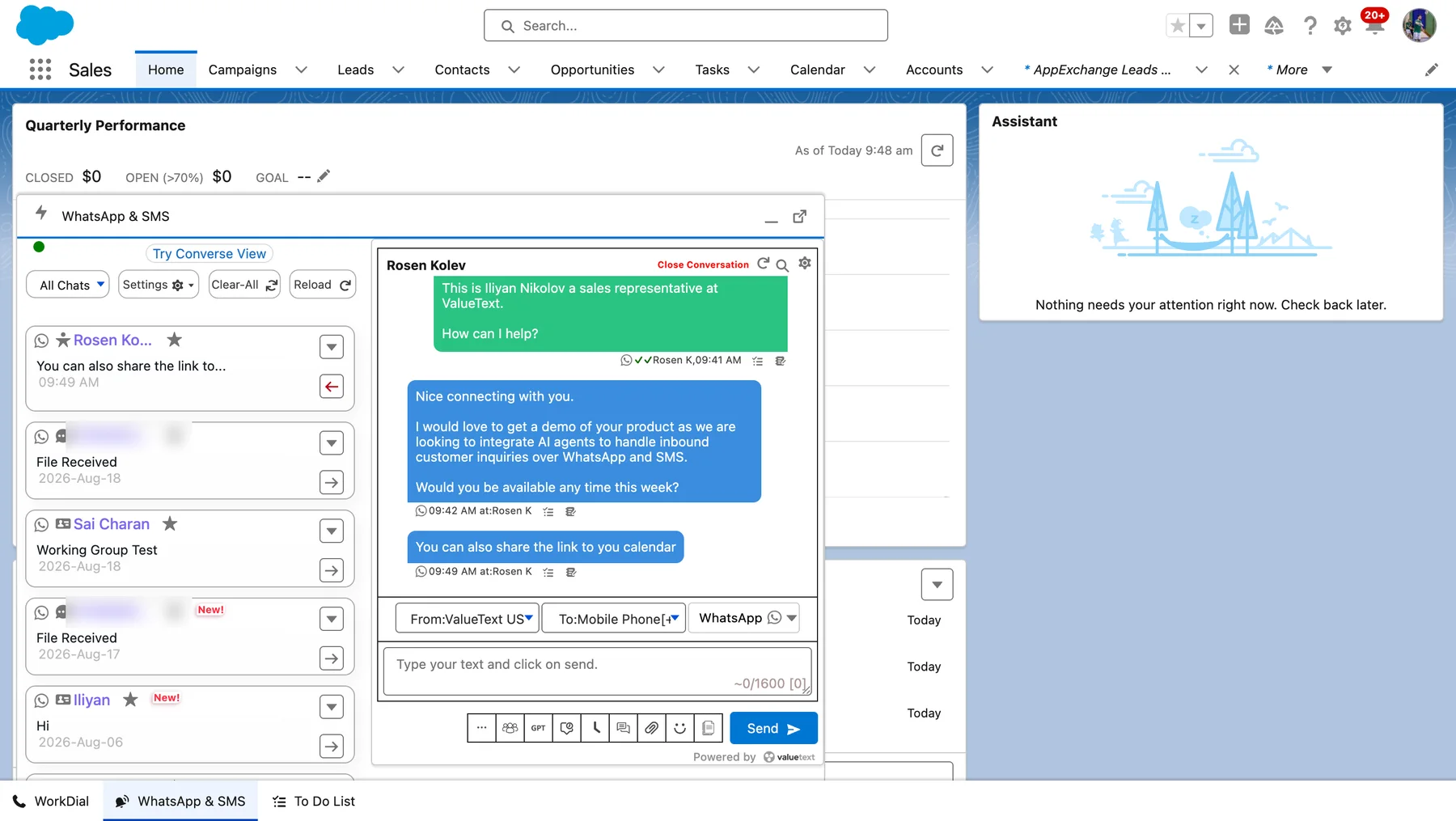
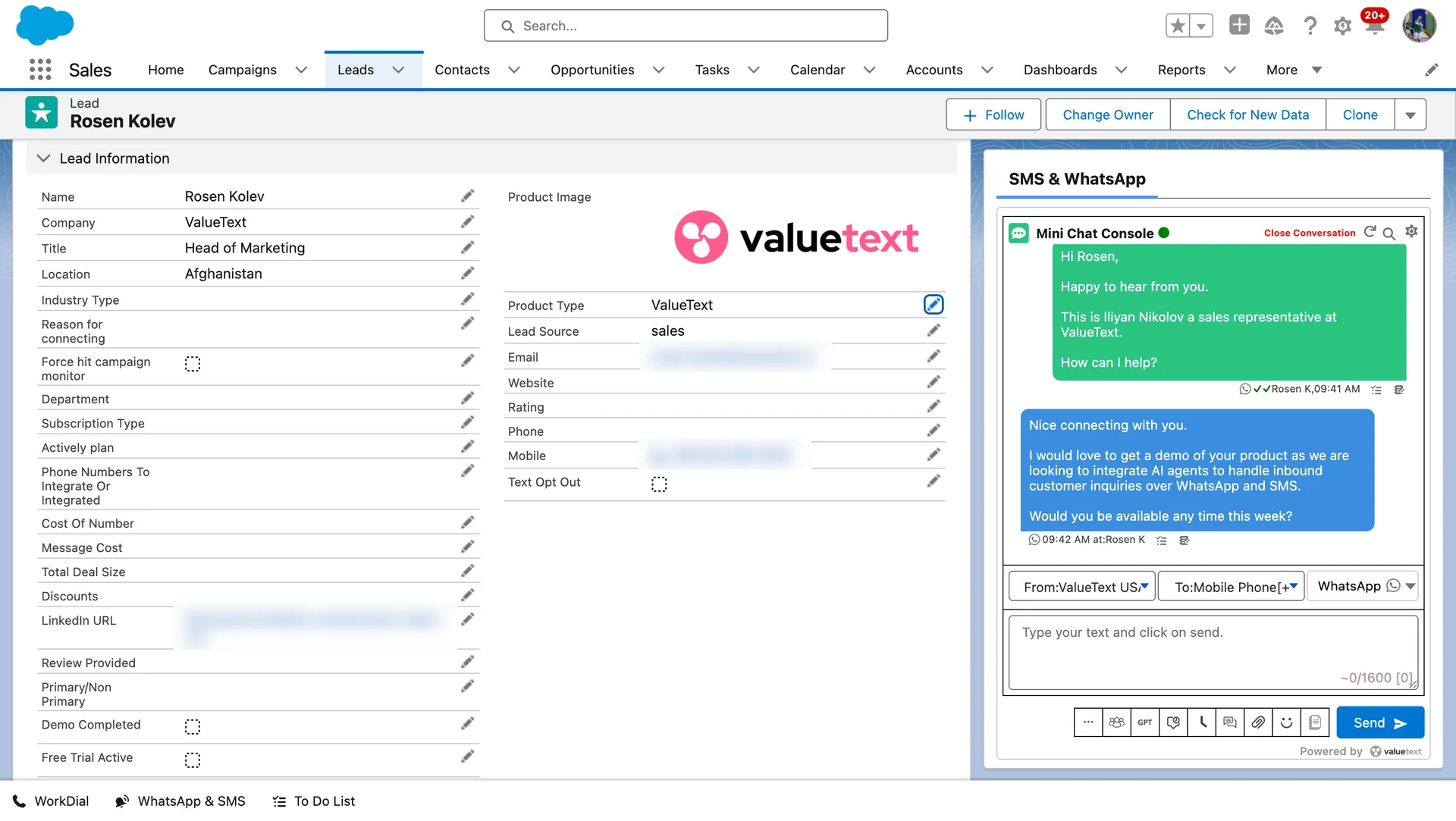
One-to-one messaging

Send an SMS or WhatsApp from the Salesforce Lead, Contact or Case. The reply comes back to that record and to the person who owns it.
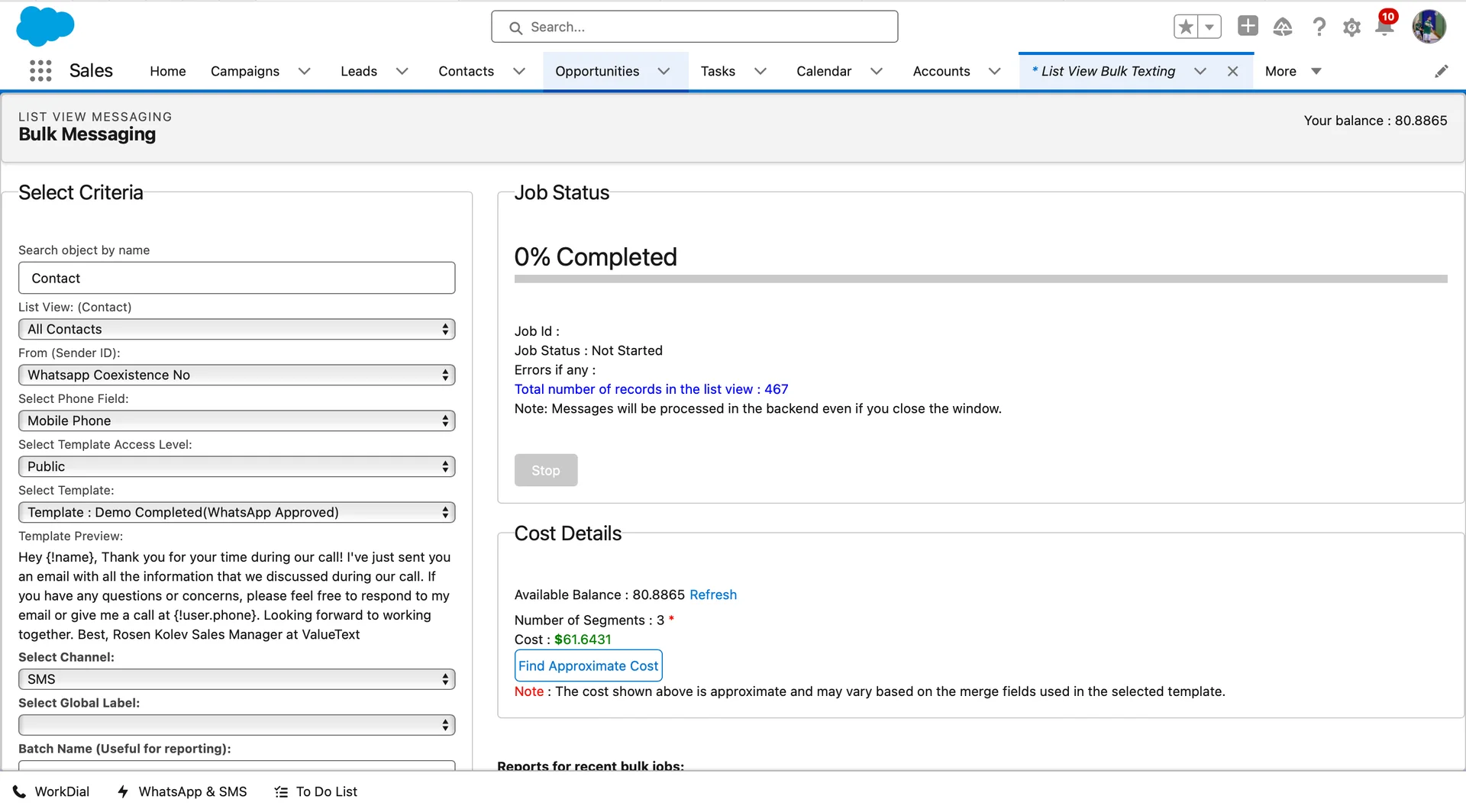
Send to a list

Pick a list view, a report or a campaign and send once. Every reply comes back as its own conversation, not a group thread.
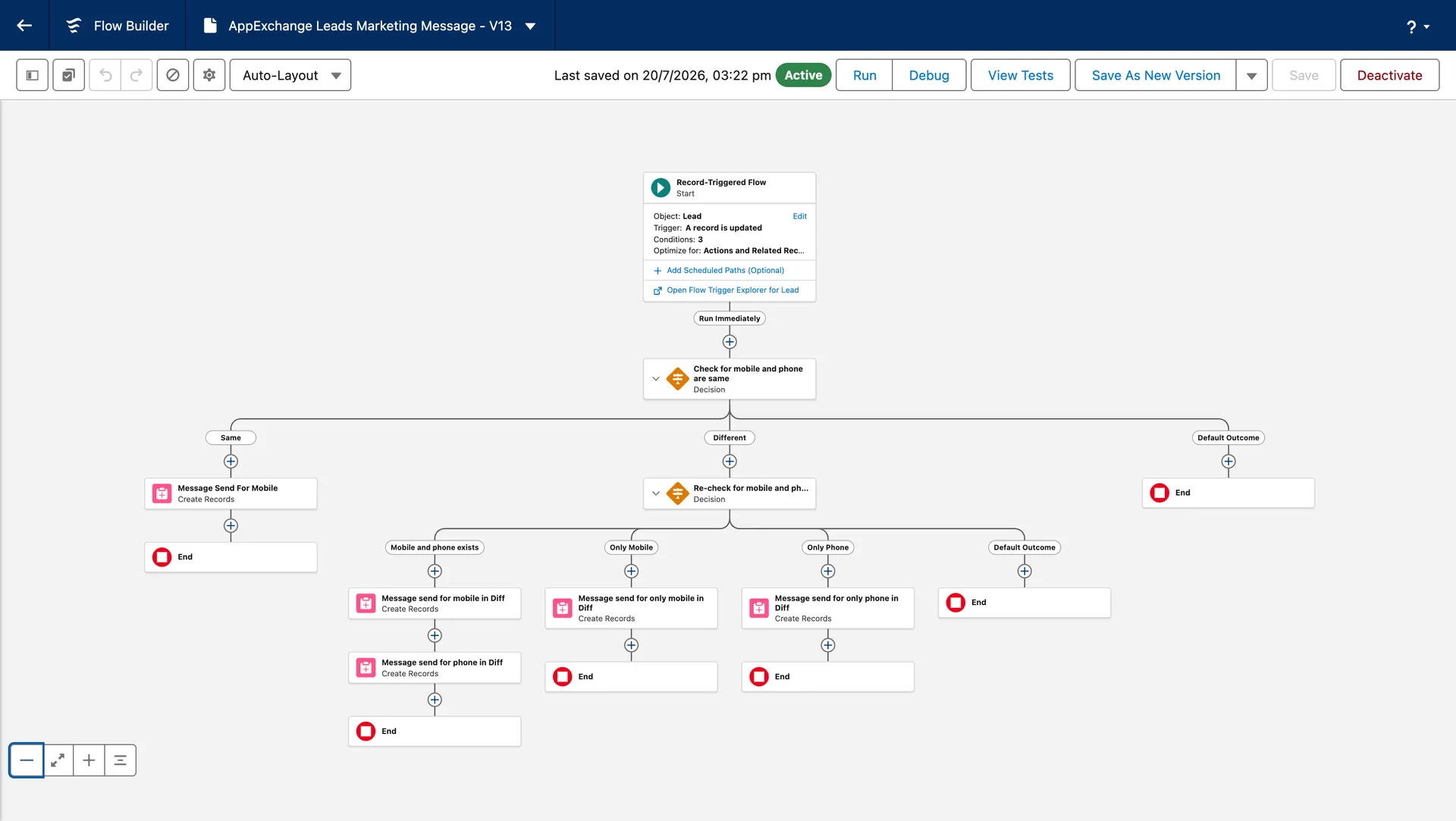
Automatic follow-ups

Your Salesforce Flows send them: a reminder before the appointment, a message when the stage changes, a first reply while the team sleeps.
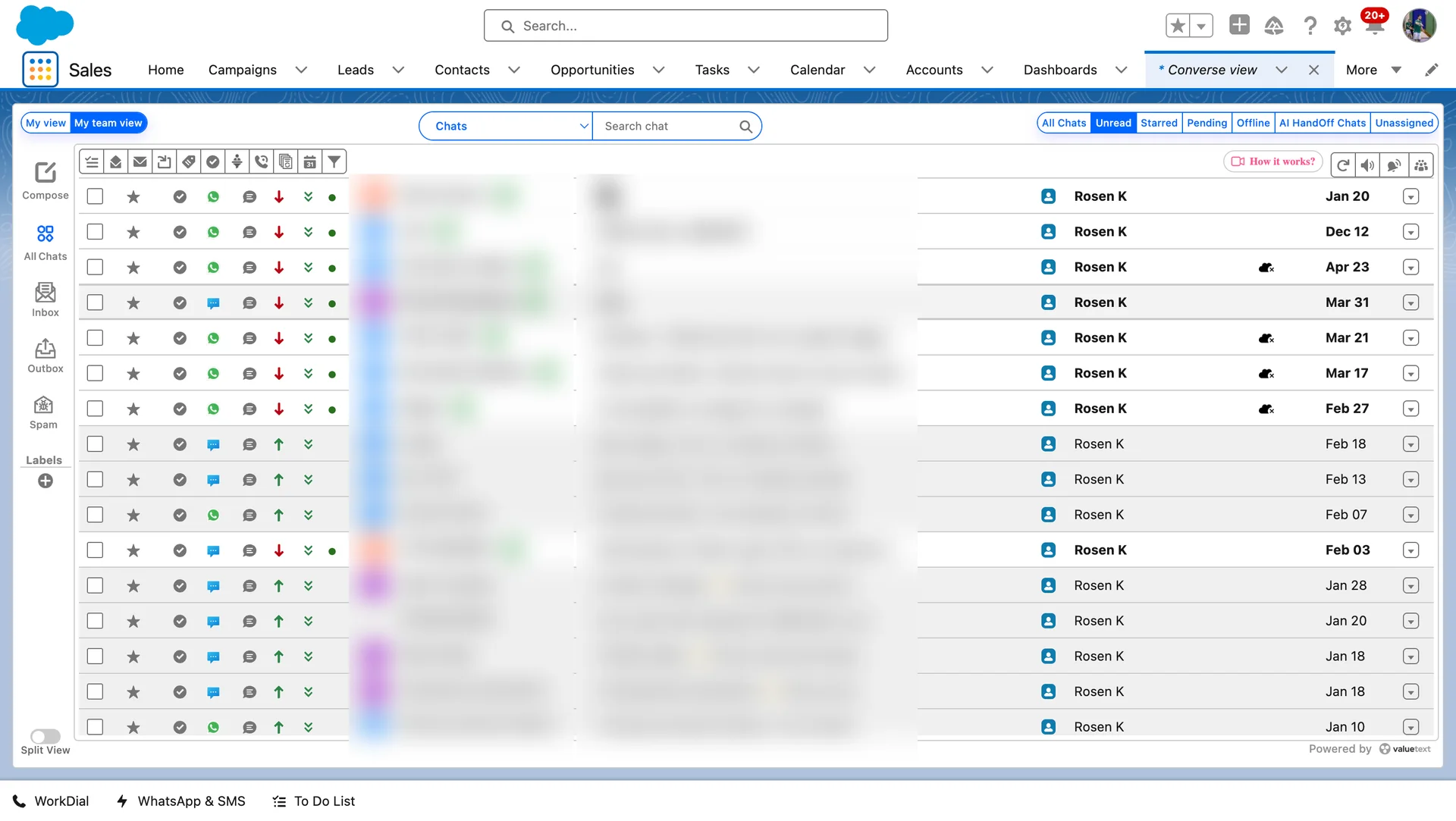
See every conversation

Converse view shows every open conversation in one inbox inside Salesforce, by owner, channel or label, so you see what is waiting and who has it.
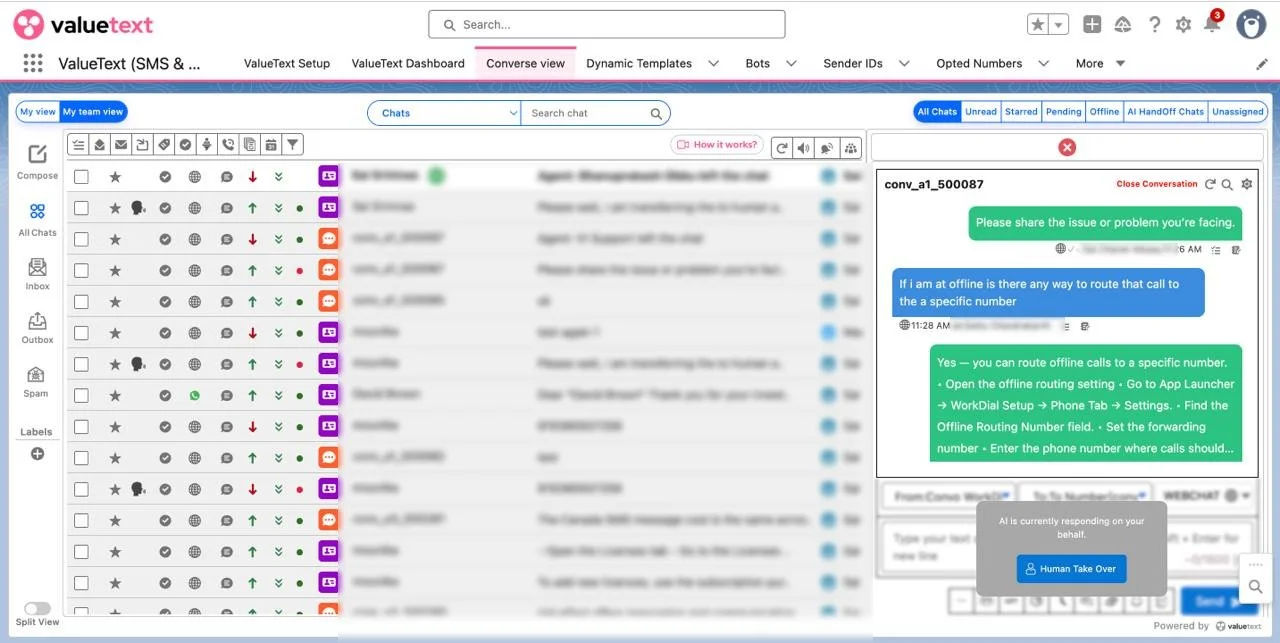
AI answers first

The AI agent answers, qualifies and books on WebChat, SMS and WhatsApp. Anything it cannot answer goes to a person, with the thread attached.
Why teams choose ValueText

More replies, fewer things falling through the cracks

Every one of these runs inside the Salesforce your team already opens each morning. Pick the job you are trying to fix.

Winning the work Doing the work, getting paid
01 · Winning the work

Speed-to-lead auto-replies

A web lead goes cold in minutes, and whoever replies first usually wins the relationship. Salesforce sends the first text the second the record is created, so nobody is waiting on a rep to notice.

Hi Priya, thanks for reaching out. This is Ana at Northgate, when’s a good time to talk?

The message that goes out
See the setup →

Speed-to-lead auto-replies

A new lead gets a text in seconds, from the owner’s number.

AI SMS drip campaigns

A sequence that stops the moment a human replies.

Group SMS

One message to a list view, replies threaded per person.

Multilingual messaging

The message goes out in the language on the contact's record.

Technician on the way

An arrival window from the work order, sent as the van leaves.

Case status updates

The customer hears when the case moves, without an agent typing it.

Volunteer shift reminders

Confirm or drop by reply, and the roster updates itself.

Payment confirmations and reminders

Due, paid, receipted. All three from the invoice record.

The channels

SMS, WhatsApp and WebChat, one thread on the Salesforce record.

SMS
9:41
‹ N Northgate ›
Text Message · Today 15:30
Reminder: your appointment with Northgate is tomorrow at 3:30pm. Reply C to confirm or M to move it.
M
Delivered
No problem. Here are the next three times we have free.
+ Text Message

Reaches every phone.

No app needed. Local and toll-free numbers, registered for business texting in the US. SMS is the channel for reminders and alerts.

Salesforce SMS →
WhatsApp
9:41
‹ WhatsApp WhatsApp✓ Business account
Today
Hi Sarah, this is Emma at Northgate. Thanks for your enquiry. Is a call this afternoon any good? 9:01
Afternoon works, after 3? 9:04✓✓
Booked you for 3:30. You will get a reminder an hour before. 9:04
+ Message

Carries the thread.

Rich media, documents, voice notes, read receipts. Runs on the official WhatsApp Business platform, with SMS fallback.

Salesforce WhatsApp →
WebChat
9:41
ValueText ValueText Online
Today 16:00
Do you have a three-bedroom near the park? Visitor · 16:00
Three bedroom homes near the park 14 Elm Row, viewing Saturday at 11:00. 8 Park Lane, viewing Sunday at 14:00.
AIValueText · 16:01
Type your message

Starts the record.

A widget on your site. A visitor’s first message creates the lead, and the AI agent answers until a person picks it up.

Security

Nothing is stored outside your org.

Every message, attachment and status is a record in your Salesforce. Our side of the ledger stays blank.

SalesforceYour orgEverything
09:12Inbound SMS from Meera ShahMessage
09:12Linked to Work Order 00482Related
09:18Outbound reply, template T-01Message
09:18Status set to ConfirmedField
18:06Photo, 1.2 MBFile
18:09Outbound WhatsApp replyMessage
18:09Delivery receiptStatus
ValueTextValueTextNothing
0 Messages stored No database, no mirror, no analytics copy. The relay forgets a message the moment it is written to your record.

Certified to ISO 27001:2022. We sign BAAs where your work requires one.

Who owns the data

Your conversations live in Salesforce, and you own them.

Messages are written to your own org, on the record they belong to. ValueText keeps no copy of its own.

01

Every message is stored in your org, not ours.

02

Your sharing rules decide who reads a thread.

03

Bring your own gateway, and send on your own account.

Send your first text today.

Installed and sending in ten minutes, from the record your team already has open.

Start free trial
How we compare

ValueText against the other SMS apps on AppExchange

Every row below is a question worth asking any vendor you are looking at, including us.

4.98 / 5 from 131 reviews On Salesforce AppExchange
What to ask ValueText OthersTypical
Where the conversation is stored Your Salesforce record The vendor's system, synced back
Runs inside your CRM, nothing in between Yes Often a separate tool synced back
Replies reach the record owner Yes Usually a shared inbox
Reportable with your own dashboards Yes Export or a separate report tool
Channels on one record SMS, WhatsApp and web chat Usually SMS alone
Support included in the fee 24/7, at no extra cost Paid tiers
Setup and training Included, unlimited Charged by the day
You keep the history if you leave Yes, it was always yours Export window, then gone

"Others" describes what is common across the SMS apps listed on AppExchange, not any one product. Check each row against whichever vendor you are comparing.

What you can report on

Every message is activity you can report on in Salesforce.

Delivery, replies and response times land on the record, so they reach a Salesforce report without an export.

Volume by channelMessages
WhatsAppSMS
806040200W1W2W3W4W5
Reply waitAgents
6 minAverage, all agents
Message volumeMessages
OutboundInboundFailed
250200150100500Jul 1Jul 15Aug 1Aug 15
ReportsMessaging
Last night’s remindersDid they go out? Outbound and failed by hour
Cost by channelWhich channel is costing us more?
Reply waitHow long is a reply waiting?
This monthMessages
Outbound243
Inbound39
Failed32
Channel splitMessages
WhatsApp 238SMS 25
263MESSAGES
DeliveryMessages
Delivered 211Failed 32
Cost by directionCosts
OutboundInbound
43210JulAug
Outbound costCosts
$3.3825 Jul to 24 Aug
Inbound cost $0. Incoming messages are free.

One org's own month, shown as an example. Your org sees yours.

What it costs
$7 per user / month

You can price it before you talk to anyone

Three prices, all published: a price per user, one base fee per account, and the message rate for the country you send to.


★★★★★

“Valuetext is the outstanding solution to integrate whatsapp and sms into salesforce. The support team can also only be praised in highest tones…”

Cédric Baumgartner Cédric BaumgartnerCPO & Co-Founder
★★★★★

“The system is very simple to use and renovate with time which is excellent. It is user friendly and the cost is very good…”

Charles Lucas Charles LucasSalesforce Lead
★★★★★

“One of the best solutions for support in Salesforce. It’s pretty user-friendly, has a good cost, and many features…”

Michail Berdinskiy Michail BerdinskiySalesforce Lead
★★★★★

“We were looking for a solution which was cost effective, easy to use and one that is continuously being developed…”

Nassar Mehmood Nassar MehmoodSalesforce Delivery Lead
★★★★★

“Valuetext is the outstanding solution to integrate whatsapp and sms into salesforce. The support team can also only be praised in highest tones…”

Cédric Baumgartner Cédric BaumgartnerCPO & Co-Founder
★★★★★

“The system is very simple to use and renovate with time which is excellent. It is user friendly and the cost is very good…”

Charles Lucas Charles LucasSalesforce Lead
★★★★★

“One of the best solutions for support in Salesforce. It’s pretty user-friendly, has a good cost, and many features…”

Michail Berdinskiy Michail BerdinskiySalesforce Lead
★★★★★

“We were looking for a solution which was cost effective, easy to use and one that is continuously being developed…”

Nassar Mehmood Nassar MehmoodSalesforce Delivery Lead
★★★★★

“Our company was looking for a text application to notify our support team on weekends and holidays…”

Renee Pierce Renee PierceSalesforce Admin
★★★★★

“After some research we found ValueText app as best to meet our needs. By using this app we’ve achieved time zone based scheduling…”

Bala Peri Bala PeriDevelopment Manager and Salesforce Architect
★★★★★

“We needed a text application that was simple to use and simple to integrate. So far it’s been reliable, and bug-free…”

Jon Levy Jon LevyChief Operating Officer
★★★★★

“Our company was looking for a text application to notify our support team on weekends and holidays…”

Renee Pierce Renee PierceSalesforce Admin
★★★★★

“After some research we found ValueText app as best to meet our needs. By using this app we’ve achieved time zone based scheduling…”

Bala Peri Bala PeriDevelopment Manager and Salesforce Architect
★★★★★

“We needed a text application that was simple to use and simple to integrate. So far it’s been reliable, and bug-free…”

Jon Levy Jon LevyChief Operating Officer
Common questions

Questions about texting from Salesforce

The ones every buyer asks on the first call, answered the way we answer them there.

01

Where does my team read and reply?

Two screens.
+

The texting window sits on a contact, lead, account, opportunity or any record of your own and messages that one customer. Converse view is the shared screen: your own threads or everyone's, an inbox and an outbox, filters for unread, starred and unassigned, labels, bulk assign, and search by name, keyword or record.

02

Does it work on the records we use?

Yes. The texting window goes on leads, contacts, accounts, opportunities and any record type of your own.
+

Bulk sending from a list view and sending from your automations work the same way on every record type.

03

Can customers reply, and where does the reply go?

Onto the record it came from, with the owner notified.
+

The next person to open that record reads the whole thread, so nobody has to ask a colleague for a screenshot of what was said.

04

Can we send to a lot of people at once?

Five ways, all inside Salesforce: type or paste numbers, upload a spreadsheet, pick a list view, send to everyone related to an account or every member of a campaign, or run a report on a schedule.
+

The bulk tab caps at a thousand messages; the spreadsheet route is the one for more.

05

Can messages send automatically?

Yes, from the automation your admin already uses.
+

A reminder before the appointment, a follow-up when a stage changes, a first reply while the team sleeps: each is set up once and sends itself, free text, a template or a bot, at a time and time zone you choose.

06

My CRM already has WhatsApp built in. Why this?

Because a built-in channel is one channel.
+

Here SMS, WhatsApp and WebChat arrive on the same thread, on the record, with bulk sending, automated sends and an AI agent all working that thread. One place to look, and one place your reports read from.

Setting it up, permissions, objects and limits are all in the documentation. Read the docs →

See it running on your own Salesforce.

Rated 4.98 on Salesforce AppExchange
Talk to us Start free trial