14 Jan
Most support orgs already send ad-hoc WhatsApp or SMS updates from Salesforce.
Very few have a consistent pattern for when and how those messages go out.
The result is predictable:
- Some customers get no confirmation when a Case is created.
- Others get random updates depending on which agent picked up the ticket.
- Managers can’t answer simple questions like “How many Cases had proactive updates before SLA breach?”
This is where a case status messaging pattern helps: one reusable model that moves every customer through the same three phases:
Acknowledge → Progress → Resolution
…with Salesforce owning the logic and your messaging app simply executing it.
1. Problem: “We’ll keep you updated” without a system
In most orgs, the promise “we’ll keep you updated” relies on individual agents:
- Status changes are made on the Case, but no message goes out.
- Some teams send a quick WhatsApp note, others don’t.
- Quiet hours, consent, and language are handled manually.
- When a customer escalates, there is no consistent audit trail of “we told them X at time Y.”
The operational cost is high:
- More inbound “just checking the status” messages.
- Longer handle times, because every update has to be typed from scratch.
- No standard way to report on how well you keep customers informed.
We want a pattern where every Case follows the same predictable messaging flow, and Salesforce owns that flow.
2. Pattern overview: Acknowledge → Progress → Resolution
At a high level, the pattern looks like this:
- Acknowledge Confirm that the Case exists and is being worked on.
- Progress Provide meaningful updates at key points: assigned, waiting on customer, parts ordered, nearing SLA, etc.
- Resolution Close the loop, confirm outcome, and optionally collect feedback.
Each phase is driven by Case events (status changes, field updates, milestones) and enforced by a small set of guardrails: consent, quiet hours, channel preference, and language.
3. Context: where this lives in Salesforce
To keep it stable, the pattern assumes three things:
- Case is the system of record Status, priority, owner, SLA, and customer details are all on or related to the Case.
- Consent and policies exist You already have a basic consent model (for example,
ContactPointConsentand a shared “Can we send this now?” subflow). - Messaging is native to Salesforce WhatsApp/SMS are sent via a Salesforce-native app (for example, ValueText) that exposes Flow actions and logs messages back on the Case/Contact.
With that in place, the pattern is mostly about when to send and what to say.
4. The core solution: three messaging tracks
4.1 Acknowledge: “We received your Case”
Trigger: Case is created from email, web form, or channel where messaging is allowed.
Typical message:
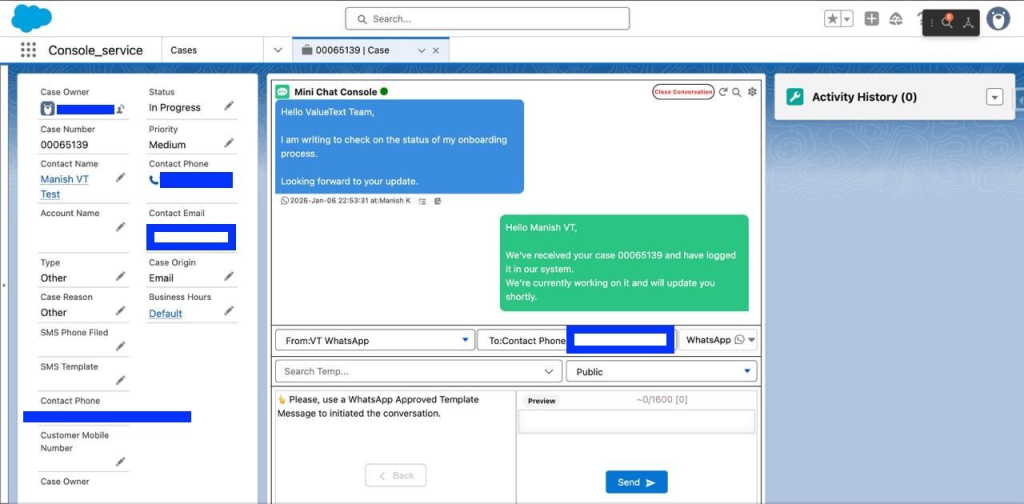
“We’ve received your request (Case {{CaseNumber}}).
Our team will review it and update you here. If you have more details, you can reply to this message.”
Salesforce behaviour:
- Record-Triggered Flow on Case (when created).
- Call shared guardrail subflow (consent, quiet hours, region).
- If allowed:
- Send WhatsApp/SMS via messaging app action.
- Stamp a “First_Status_Notification_Sent_c” date/time field.
Every new customer Case now has a consistent confirmation.
4.2 Progress: “We’re working on it”
Triggers:
A small set of meaningful status transitions, for example:
New → In Progress(assigned and under investigation)In Progress → Waiting on Customer(need more info)In Progress → On Hold(external dependency)
For each transition, define a template:
- Assigned: “Your request {{CaseNumber}} is now with our support team. We’ll update you as soon as we have more details.”
- Waiting on Customer: “We need a bit more information to move forward with Case {{CaseNumber}}. Please reply with…”
- On Hold: “We’re waiting on a third party to progress Case {{CaseNumber}}. We’ll notify you as soon as we have an update.”
Salesforce behaviour:
- Record-Triggered Flow on Case (when
Statuschanges). - Decision element checks:
- OldStatus / NewStatus combination.
- Priority or record type if you only want this for certain queues.
- Guardrail subflow again (consent, quiet hours, region).
- If allowed:
- Send appropriate template.
- Optionally log a small “Last_Status_Message_c” field.
You’re not messaging on every micro-change, only on events that actually matter to the customer.
4.3 Resolution: “We’ve closed your Case”
Triggers:
Status → Closedor equivalent final status.
Templates:
- Resolution confirmation: “We’ve now closed Case {{CaseNumber}} with status {{Status}}. If this doesn’t match your expectation, reply here and we’ll reopen.”
- Optional CSAT: “Quick question: how satisfied are you with the resolution of Case {{CaseNumber}}? Reply with a score from 1 to 5.”
Salesforce behaviour:
- Same pattern: Record-Triggered Flow on status → guardrails → send.
- CSAT response can update a custom field or a related Survey/Feedback object.
Now your reporting can connect status, messaging, and satisfaction cleanly.
5. Variations: adapting the pattern
This pattern is intentionally simple. You can extend it in a few common ways:
- Channel preference Use a field on Contact or Case (
Preferred_Channel_c) to choose WhatsApp vs SMS per customer. - Priority bands Only send progress updates automatically for high/urgent Cases, keep low priority Cases silent unless they breach SLA.
- Language Store
Preferred_Language_cand route to different templates per language, still following the same three-phase structure. - Self-service links For customers with a portal, add a link to “View Case” rather than forcing everything into messaging.
The core idea stays the same: Case events drive messaging according to a shared pattern, not per-agent habit.
6. Trade-offs and guardrails
A few decisions are worth being explicit about:
- Too many vs too few messages Sending on every status change will annoy customers. Limit to the three phases and a handful of key transitions.
- Automation vs agent control You can let agents trigger a “Progress update” manually from a Quick Action that calls the same Flow, if you want more control in complex Cases.
- Quiet hours and region Guardrails must live in Salesforce, not in someone’s head. Use the same subflow you already use for campaigns and notifications.
- Compliance and opt-out Every inbound “STOP” or equivalent should update your consent model and automatically block future Case status messages on that channel.
As long as these guardrails live in Salesforce, the pattern remains safe and reusable across teams.
7. Where ValueText fits
In this pattern, Salesforce owns:
- Case events and status
- Guardrails and consent
- Reporting and CSAT
A native messaging app like ValueText simply:
- Exposes Flow actions for WhatsApp and SMS.
- Logs messages and conversations on Case / Contact records.
- Respects your existing consent and governance model.
If you want a reference implementation of this Case status messaging pattern including example templates, Flow structure, and guardrail design; the ValueText team can share a working setup focused purely on architecture and configuration.
Request a Demo
If you’d like a native Salesforce messaging app that supports this acknowledge → progress → resolution pattern out of the box, you can find ValueText on AppExchange: AppExchange link
Author : Nikhil – Senior Client Consultant, ValueText
I lead global marketing and Salesforce integration initiatives for ValueText’s SaaS messaging platform. I writes high-impact blogs, guides new users through onboarding and training, and drives adoption of SMS / WhatsApp automation across industries. Passionate about the crossroads of marketing, technology, and client success.
Other useful articles
Learn how to improve customer communication in Salesforce