Product·5 Oct 2026·5 min read

WhatsApp Coexistence for Salesforce: Use the App and Your CRM on One Number

How Meta's Coexistence update lets sales, support, and field teams keep the WhatsApp Business App while Salesforce and ValueText track every conversation.

What Is WhatsApp Coexistence?

Quick version: you no longer have to choose between the WhatsApp Business App and a proper CRM integration. Now you get both, on the same number.

If your team has ever used WhatsApp for work, you know the trade-off. The WhatsApp Business App is simple and personal, but it lives on one phone. A CRM-connected number through the WhatsApp Cloud API scales beautifully, but until now, switching to it meant giving up the app, and often losing chat history in the process.

WhatsApp Coexistence, rolled out by Meta, closes that gap. It lets a business run the WhatsApp Business App and the WhatsApp Cloud API on the very same phone number, at the same time. Nothing gets abandoned. Nothing gets lost.

For Salesforce users, this is a big deal. It means a rep or field agent can still tap out a quick reply from their phone, while every message, old and new, also lands inside Salesforce through an app like ValueText.

Fig 01 · One number, two waysDrawn
01 · PhoneWhatsApp Business AppQuick one-to-one replies from a rep's phone.
02 · One numberYour business WhatsApp numberSame number. Same conversation.
03 · CRMValueText on SalesforceTemplates, automation and the full record for the team.
Fig 01 · One WhatsApp number, used from both the mobile app and Salesforce, kept in sync.

How Coexistence Works (Without the Technical Deep-Dive)

Under the hood there's a fair bit of API and webhook machinery, but for a business owner or sales manager, the process boils down to four simple moves.

Fig 02 · From signup to syncedDrawn
01 · SignupConnect the numberLink the existing number to Salesforce.
→
02 · ApproveConfirm in the appEnter the code in the Business App.
→
03 · HistoryHistory syncs overContacts and up to 6 months of chats.
→
04 · OngoingChats stay mirroredEvery new message shows on both sides.
Fig 02 · The four-step path from signup to a fully synced number.
  • Connect: the existing WhatsApp number is linked to a CRM platform through Meta's Embedded Signup flow, without starting a new number from scratch.
  • Confirm: a short verification code is entered inside the WhatsApp Business App to approve the connection.
  • Sync: contacts and up to six months of past conversations copy over automatically, so history isn't lost in the switch.
  • Mirror: from then on, every message sent or received, whether from the phone app or the connected CRM, shows up on both sides.

Two details worth knowing upfront. First, from 1 October 2026 Meta charges for messages sent from the WhatsApp Business App as well as for messages sent through the connected platform, and ValueText passes Meta's rate through with no markup. Coexistence runs on ValueText's direct Meta integration, which is $10 a month per number. Second, a few app-only features, like disappearing messages, view-once media, and creating new broadcast lists, get switched off for 1:1 chats once Coexistence is active. Group chats and calls in the app are unaffected either way.

How It Works in Salesforce with ValueText

ValueText plugs into this Coexistence flow so a Salesforce team doesn't have to manage any of the API plumbing themselves. Once the business connects its WhatsApp number through ValueText's Embedded Signup, everything routes into familiar Salesforce screens.

Every chat lands on the right record

Messages sent or received on the WhatsApp Business App show up automatically inside ValueText's Converse view and the Salesforce utility component, matched to the right Contact, Lead, Case, or custom object using native record matching. If a match isn't obvious, a rep can link the conversation manually in a couple of clicks.
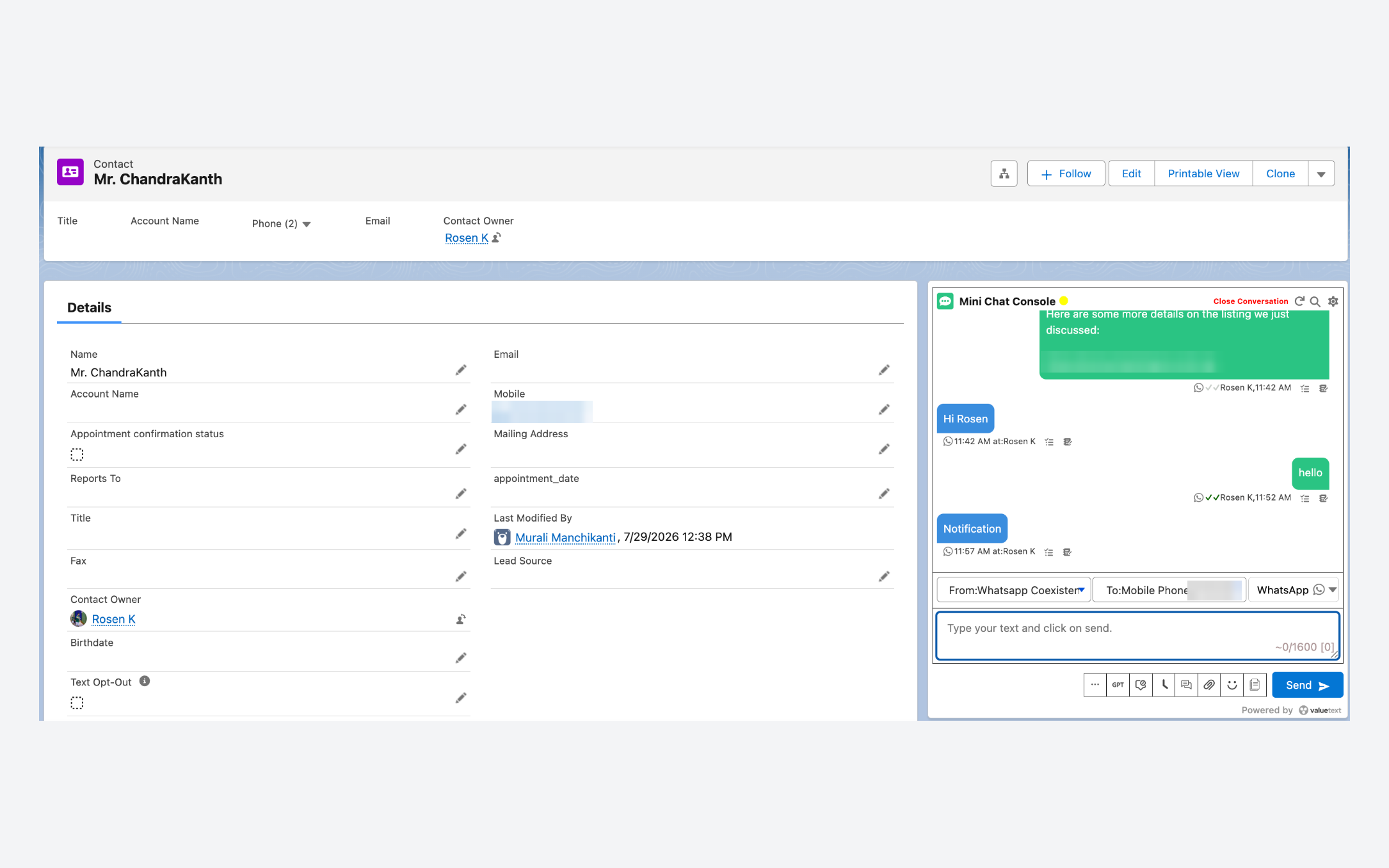
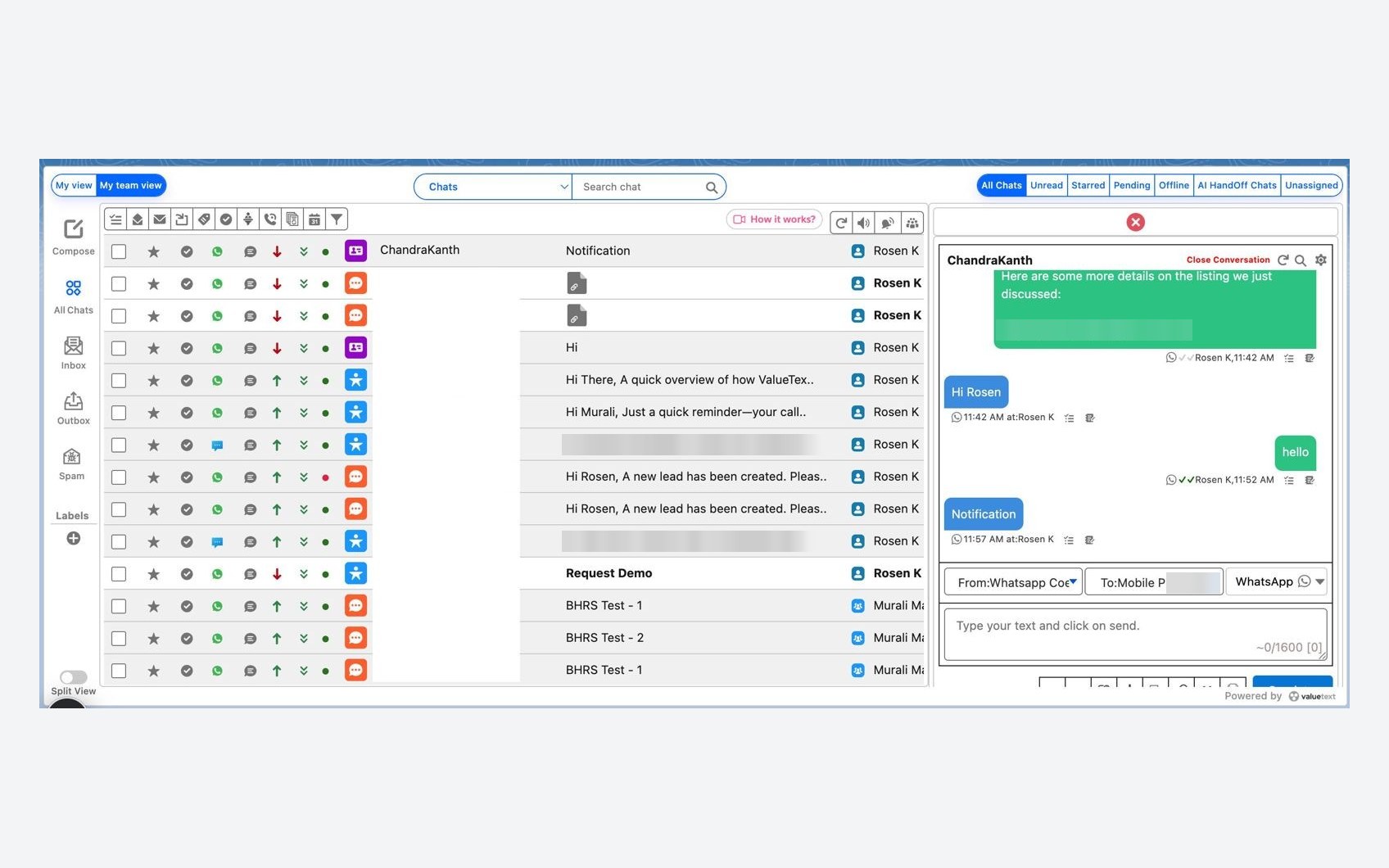
Fig 03 · Record
A Salesforce Contact record with the ValueText chat console beside it, showing the same WhatsApp conversation sent from the Coexistence number.
Fig 03 · A Salesforce Contact record with the ValueText chat console beside it, showing the same WhatsApp conversation sent from the Coexistence number.
Fig 04 · Converse View
The ValueText Converse view in Salesforce: the team inbox of chats on the left and the open WhatsApp conversation on the right.
Fig 04 · The ValueText Converse view in Salesforce: the team inbox of chats on the left and the open WhatsApp conversation on the right.
Fig 05 · Business App
The WhatsApp Business App on the business phone, showing the same conversation, including the messages sent from Salesforce.
Fig 05 · The WhatsApp Business App on the business phone, showing the same conversation, including the messages sent from Salesforce.
Fig 06 · Customer WhatsApp
The customer's own WhatsApp, showing the conversation with the business as one thread.
Fig 06 · The customer's own WhatsApp, showing the conversation with the business as one thread.

Templates and triggers still apply

Even with the app in the mix, ValueText's app-level configuration can still auto-trigger template messages, like a phone-number request or a welcome message, based on Salesforce automation. The CRM side keeps doing its job while the app stays open for personal replies.

Nothing depends on one person's phone

This is the real shift. Before Coexistence, a rep leaving the company, losing a phone, or simply going on leave could mean losing the conversation entirely. Now the CRM has its own full copy, tracked, reportable, and visible to a manager, regardless of what happens to any one device.

Benefits and Use Cases

The clearest win is for teams that are constantly moving between a phone and a desktop, and need every message to end up in one place regardless of which one they used.

Sales teams

  • Reps message leads instantly from the WhatsApp Business App between meetings, and the conversation still lands on the Opportunity or Lead record.
  • Managers get visibility into deal conversations without asking a rep to forward screenshots.
  • If a rep changes phones, roles, or leaves the team, the conversation history stays with the account, not the device.

Support teams

  • Agents can reply quickly and personally from the app during a call or while away from their desk, while the case timeline in Salesforce stays complete.
  • Handoffs between shifts or agents don't lose context, since the full thread is visible in the Converse view, not locked on one phone.
  • Response times improve because agents aren't forced to choose between speed and record-keeping.

Field teams

  • Technicians and field agents can message customers directly from a job site using the app they already know, no extra software to learn.
  • Office staff see the same conversation in Salesforce in real time, so a scheduling change or customer question doesn't get stuck on someone's personal phone.
  • Photos, updates, and confirmations sent on-site are captured against the right work order or service record automatically.

Everywhere else

  • Real estate teams keep buyer conversations tied to the property record, even when an agent is showing homes all day.
  • Logistics and delivery teams give drivers a familiar app while dispatch tracks every customer update centrally.
  • Any team juggling in-person and CRM-based messaging gets one consistent record instead of two half-complete ones.

The pattern across all of these is the same: the team member keeps the tool they already like, and the business keeps the tracking, reporting, and continuity that a CRM is supposed to provide.

Ready to Turn On Coexistence in Salesforce?

ValueText supports WhatsApp Coexistence natively, so your team can keep the WhatsApp Business App while Salesforce gets the full, synced picture. Book a demo to see it set up on your own number.

Looking for the same kind of visibility on calls? WorkDial brings Salesforce-native voice calling to pair with ValueText's messaging, so voice and WhatsApp both stay logged in one place.

Explore next:

Questions about this guide? Write to us. Talk to us→

Keep reading

All posts→
Product WhatsApp Salesforce Integration with ValueText How WhatsApp Salesforce integration works with ValueText: two-way messaging, templates and automation on your own records. 30 Jun 2025 · 4 min read Product Why Most Salesforce Messaging Fails and How to Fix It Salesforce messaging often fails from generic templates, bad timing, and notification fatigue. Here is how top teams fix it. 16 May 2025 · 4 min read Compliance WhatsApp pricing changes, October 2026 Meta begins charging for service and session messages on 1 October, including messages sent from the WhatsApp Business app. What changes, what does not, and what it means for your spend. 4 Sep 2026 · 6 min read
Product·5 Oct 2026·5 min read

WhatsApp Coexistence for Salesforce: Use the App and Your CRM on One Number

How Meta's Coexistence update lets sales, support, and field teams keep the WhatsApp Business App while Salesforce and ValueText track every conversation.

What Is WhatsApp Coexistence?

Quick version: you no longer have to choose between the WhatsApp Business App and a proper CRM integration. Now you get both, on the same number.

If your team has ever used WhatsApp for work, you know the trade-off. The WhatsApp Business App is simple and personal, but it lives on one phone. A CRM-connected number through the WhatsApp Cloud API scales beautifully, but until now, switching to it meant giving up the app, and often losing chat history in the process.

WhatsApp Coexistence, rolled out by Meta, closes that gap. It lets a business run the WhatsApp Business App and the WhatsApp Cloud API on the very same phone number, at the same time. Nothing gets abandoned. Nothing gets lost.

For Salesforce users, this is a big deal. It means a rep or field agent can still tap out a quick reply from their phone, while every message, old and new, also lands inside Salesforce through an app like ValueText.

Fig 01 · One number, two waysDrawn
01 · PhoneWhatsApp Business AppQuick one-to-one replies from a rep's phone.
02 · One numberYour business WhatsApp numberSame number. Same conversation.
03 · CRMValueText on SalesforceTemplates, automation and the full record for the team.
Fig 01 · One WhatsApp number, used from both the mobile app and Salesforce, kept in sync.

How Coexistence Works (Without the Technical Deep-Dive)

Under the hood there's a fair bit of API and webhook machinery, but for a business owner or sales manager, the process boils down to four simple moves.

Fig 02 · From signup to syncedDrawn
01 · SignupConnect the numberLink the existing number to Salesforce.
→
02 · ApproveConfirm in the appEnter the code in the Business App.
→
03 · HistoryHistory syncs overContacts and up to 6 months of chats.
→
04 · OngoingChats stay mirroredEvery new message shows on both sides.
Fig 02 · The four-step path from signup to a fully synced number.
  • Connect: the existing WhatsApp number is linked to a CRM platform through Meta's Embedded Signup flow, without starting a new number from scratch.
  • Confirm: a short verification code is entered inside the WhatsApp Business App to approve the connection.
  • Sync: contacts and up to six months of past conversations copy over automatically, so history isn't lost in the switch.
  • Mirror: from then on, every message sent or received, whether from the phone app or the connected CRM, shows up on both sides.

Two details worth knowing upfront. First, from 1 October 2026 Meta charges for messages sent from the WhatsApp Business App as well as for messages sent through the connected platform, and ValueText passes Meta's rate through with no markup. Coexistence runs on ValueText's direct Meta integration, which is $10 a month per number. Second, a few app-only features, like disappearing messages, view-once media, and creating new broadcast lists, get switched off for 1:1 chats once Coexistence is active. Group chats and calls in the app are unaffected either way.

How It Works in Salesforce with ValueText

ValueText plugs into this Coexistence flow so a Salesforce team doesn't have to manage any of the API plumbing themselves. Once the business connects its WhatsApp number through ValueText's Embedded Signup, everything routes into familiar Salesforce screens.

Every chat lands on the right record

Messages sent or received on the WhatsApp Business App show up automatically inside ValueText's Converse view and the Salesforce utility component, matched to the right Contact, Lead, Case, or custom object using native record matching. If a match isn't obvious, a rep can link the conversation manually in a couple of clicks.
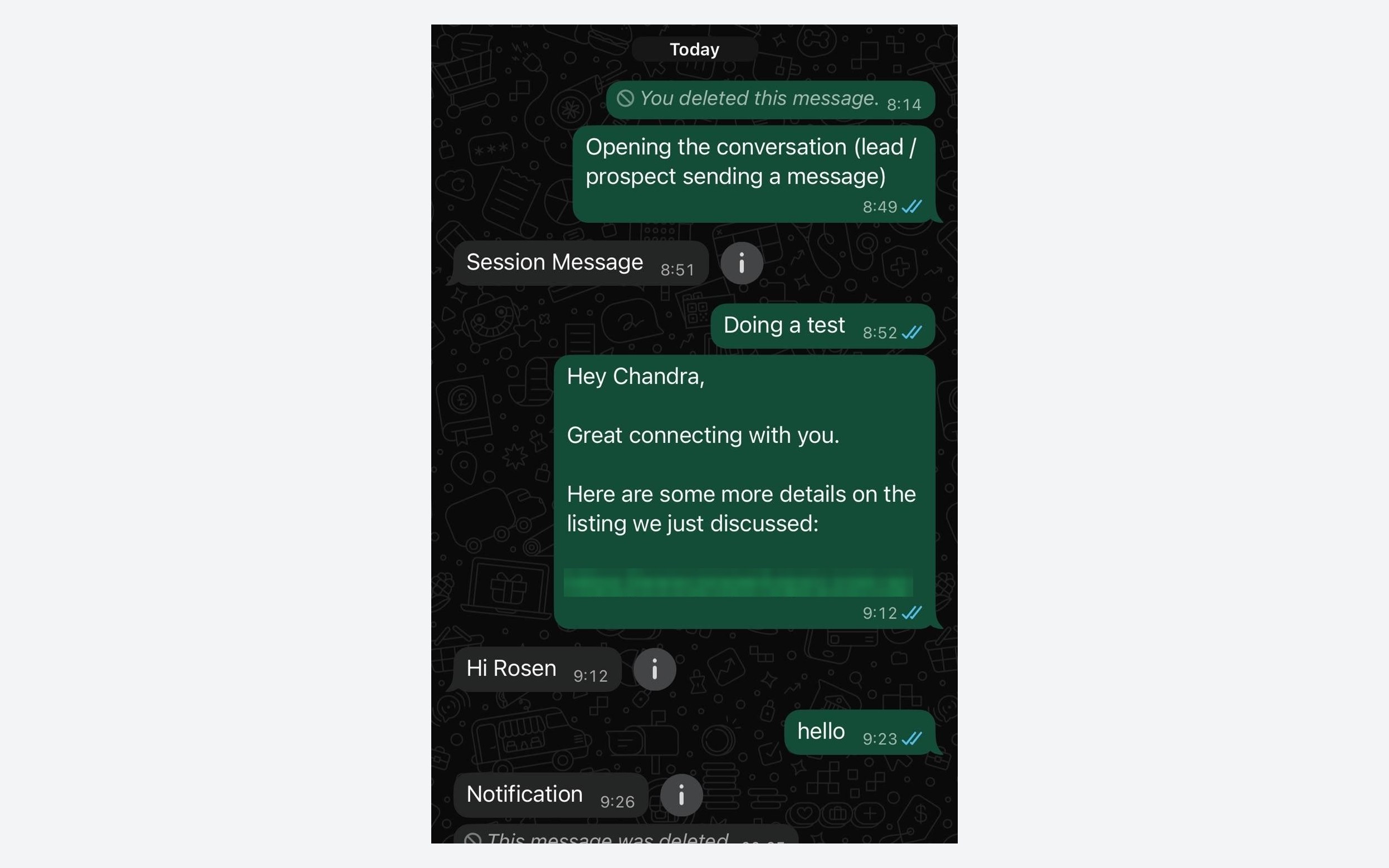
Fig 03 · Record
A Salesforce Contact record with the ValueText chat console beside it, showing the same WhatsApp conversation sent from the Coexistence number.
Fig 03 · A Salesforce Contact record with the ValueText chat console beside it, showing the same WhatsApp conversation sent from the Coexistence number.
Fig 04 · Converse View
The ValueText Converse view in Salesforce: the team inbox of chats on the left and the open WhatsApp conversation on the right.
Fig 04 · The ValueText Converse view in Salesforce: the team inbox of chats on the left and the open WhatsApp conversation on the right.
Fig 05 · Business App
The WhatsApp Business App on the business phone, showing the same conversation, including the messages sent from Salesforce.
Fig 05 · The WhatsApp Business App on the business phone, showing the same conversation, including the messages sent from Salesforce.
Fig 06 · Customer WhatsApp
The customer's own WhatsApp, showing the conversation with the business as one thread.
Fig 06 · The customer's own WhatsApp, showing the conversation with the business as one thread.

Templates and triggers still apply

Even with the app in the mix, ValueText's app-level configuration can still auto-trigger template messages, like a phone-number request or a welcome message, based on Salesforce automation. The CRM side keeps doing its job while the app stays open for personal replies.

Nothing depends on one person's phone

This is the real shift. Before Coexistence, a rep leaving the company, losing a phone, or simply going on leave could mean losing the conversation entirely. Now the CRM has its own full copy, tracked, reportable, and visible to a manager, regardless of what happens to any one device.

Benefits and Use Cases

The clearest win is for teams that are constantly moving between a phone and a desktop, and need every message to end up in one place regardless of which one they used.

Sales teams

  • Reps message leads instantly from the WhatsApp Business App between meetings, and the conversation still lands on the Opportunity or Lead record.
  • Managers get visibility into deal conversations without asking a rep to forward screenshots.
  • If a rep changes phones, roles, or leaves the team, the conversation history stays with the account, not the device.

Support teams

  • Agents can reply quickly and personally from the app during a call or while away from their desk, while the case timeline in Salesforce stays complete.
  • Handoffs between shifts or agents don't lose context, since the full thread is visible in the Converse view, not locked on one phone.
  • Response times improve because agents aren't forced to choose between speed and record-keeping.

Field teams

  • Technicians and field agents can message customers directly from a job site using the app they already know, no extra software to learn.
  • Office staff see the same conversation in Salesforce in real time, so a scheduling change or customer question doesn't get stuck on someone's personal phone.
  • Photos, updates, and confirmations sent on-site are captured against the right work order or service record automatically.

Everywhere else

  • Real estate teams keep buyer conversations tied to the property record, even when an agent is showing homes all day.
  • Logistics and delivery teams give drivers a familiar app while dispatch tracks every customer update centrally.
  • Any team juggling in-person and CRM-based messaging gets one consistent record instead of two half-complete ones.

The pattern across all of these is the same: the team member keeps the tool they already like, and the business keeps the tracking, reporting, and continuity that a CRM is supposed to provide.

Ready to Turn On Coexistence in Salesforce?

ValueText supports WhatsApp Coexistence natively, so your team can keep the WhatsApp Business App while Salesforce gets the full, synced picture. Book a demo to see it set up on your own number.

Looking for the same kind of visibility on calls? WorkDial brings Salesforce-native voice calling to pair with ValueText's messaging, so voice and WhatsApp both stay logged in one place.

Explore next:

Questions about this guide? Write to us. Talk to us→

Keep reading

All posts→
Product WhatsApp Salesforce Integration with ValueText How WhatsApp Salesforce integration works with ValueText: two-way messaging, templates and automation on your own records. 30 Jun 2025 · 4 min read Product Why Most Salesforce Messaging Fails and How to Fix It Salesforce messaging often fails from generic templates, bad timing, and notification fatigue. Here is how top teams fix it. 16 May 2025 · 4 min read Compliance WhatsApp pricing changes, October 2026 Meta begins charging for service and session messages on 1 October, including messages sent from the WhatsApp Business app. What changes, what does not, and what it means for your spend. 4 Sep 2026 · 6 min read
Product·5 Oct 2026·5 min read

WhatsApp Coexistence for Salesforce: Use the App and Your CRM on One Number

How Meta's Coexistence update lets sales, support, and field teams keep the WhatsApp Business App while Salesforce and ValueText track every conversation.

What Is WhatsApp Coexistence?

Quick version: you no longer have to choose between the WhatsApp Business App and a proper CRM integration. Now you get both, on the same number.

If your team has ever used WhatsApp for work, you know the trade-off. The WhatsApp Business App is simple and personal, but it lives on one phone. A CRM-connected number through the WhatsApp Cloud API scales beautifully, but until now, switching to it meant giving up the app, and often losing chat history in the process.

WhatsApp Coexistence, rolled out by Meta, closes that gap. It lets a business run the WhatsApp Business App and the WhatsApp Cloud API on the very same phone number, at the same time. Nothing gets abandoned. Nothing gets lost.

For Salesforce users, this is a big deal. It means a rep or field agent can still tap out a quick reply from their phone, while every message, old and new, also lands inside Salesforce through an app like ValueText.

Fig 01 · One number, two waysDrawn
01 · PhoneWhatsApp Business AppQuick one-to-one replies from a rep's phone.
02 · One numberYour business WhatsApp numberSame number. Same conversation.
03 · CRMValueText on SalesforceTemplates, automation and the full record for the team.
Fig 01 · One WhatsApp number, used from both the mobile app and Salesforce, kept in sync.

How Coexistence Works (Without the Technical Deep-Dive)

Under the hood there's a fair bit of API and webhook machinery, but for a business owner or sales manager, the process boils down to four simple moves.

Fig 02 · From signup to syncedDrawn
01 · SignupConnect the numberLink the existing number to Salesforce.
→
02 · ApproveConfirm in the appEnter the code in the Business App.
→
03 · HistoryHistory syncs overContacts and up to 6 months of chats.
→
04 · OngoingChats stay mirroredEvery new message shows on both sides.
Fig 02 · The four-step path from signup to a fully synced number.
  • Connect: the existing WhatsApp number is linked to a CRM platform through Meta's Embedded Signup flow, without starting a new number from scratch.
  • Confirm: a short verification code is entered inside the WhatsApp Business App to approve the connection.
  • Sync: contacts and up to six months of past conversations copy over automatically, so history isn't lost in the switch.
  • Mirror: from then on, every message sent or received, whether from the phone app or the connected CRM, shows up on both sides.

Two details worth knowing upfront. First, from 1 October 2026 Meta charges for messages sent from the WhatsApp Business App as well as for messages sent through the connected platform, and ValueText passes Meta's rate through with no markup. Coexistence runs on ValueText's direct Meta integration, which is $10 a month per number. Second, a few app-only features, like disappearing messages, view-once media, and creating new broadcast lists, get switched off for 1:1 chats once Coexistence is active. Group chats and calls in the app are unaffected either way.

How It Works in Salesforce with ValueText

ValueText plugs into this Coexistence flow so a Salesforce team doesn't have to manage any of the API plumbing themselves. Once the business connects its WhatsApp number through ValueText's Embedded Signup, everything routes into familiar Salesforce screens.

Every chat lands on the right record

Messages sent or received on the WhatsApp Business App show up automatically inside ValueText's Converse view and the Salesforce utility component, matched to the right Contact, Lead, Case, or custom object using native record matching. If a match isn't obvious, a rep can link the conversation manually in a couple of clicks.
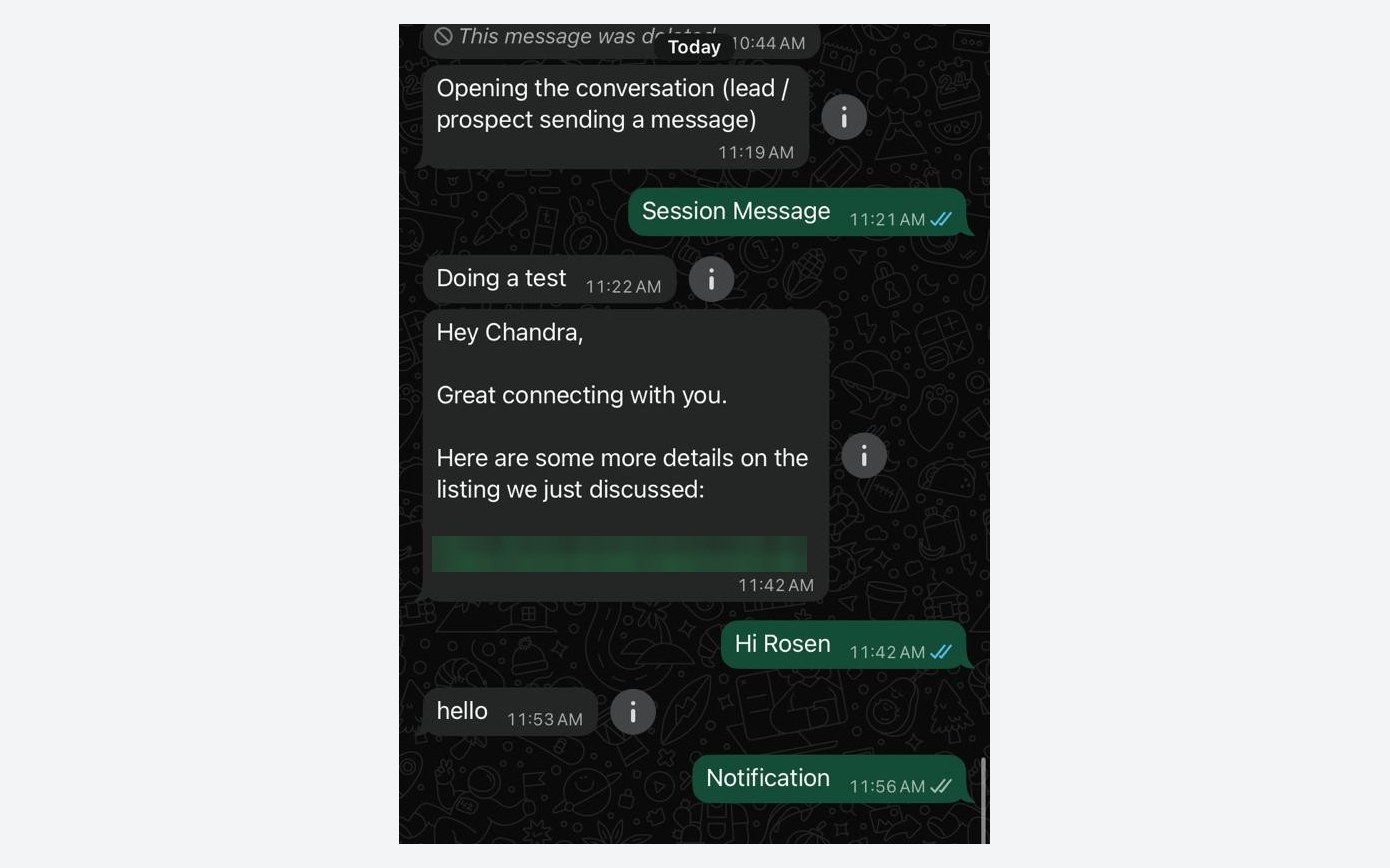
Fig 03 · Record
A Salesforce Contact record with the ValueText chat console beside it, showing the same WhatsApp conversation sent from the Coexistence number.
Fig 03 · A Salesforce Contact record with the ValueText chat console beside it, showing the same WhatsApp conversation sent from the Coexistence number.
Fig 04 · Converse View
The ValueText Converse view in Salesforce: the team inbox of chats on the left and the open WhatsApp conversation on the right.
Fig 04 · The ValueText Converse view in Salesforce: the team inbox of chats on the left and the open WhatsApp conversation on the right.
Fig 05 · Business App
The WhatsApp Business App on the business phone, showing the same conversation, including the messages sent from Salesforce.
Fig 05 · The WhatsApp Business App on the business phone, showing the same conversation, including the messages sent from Salesforce.
Fig 06 · Customer WhatsApp
The customer's own WhatsApp, showing the conversation with the business as one thread.
Fig 06 · The customer's own WhatsApp, showing the conversation with the business as one thread.

Templates and triggers still apply

Even with the app in the mix, ValueText's app-level configuration can still auto-trigger template messages, like a phone-number request or a welcome message, based on Salesforce automation. The CRM side keeps doing its job while the app stays open for personal replies.

Nothing depends on one person's phone

This is the real shift. Before Coexistence, a rep leaving the company, losing a phone, or simply going on leave could mean losing the conversation entirely. Now the CRM has its own full copy, tracked, reportable, and visible to a manager, regardless of what happens to any one device.

Benefits and Use Cases

The clearest win is for teams that are constantly moving between a phone and a desktop, and need every message to end up in one place regardless of which one they used.

Sales teams

  • Reps message leads instantly from the WhatsApp Business App between meetings, and the conversation still lands on the Opportunity or Lead record.
  • Managers get visibility into deal conversations without asking a rep to forward screenshots.
  • If a rep changes phones, roles, or leaves the team, the conversation history stays with the account, not the device.

Support teams

  • Agents can reply quickly and personally from the app during a call or while away from their desk, while the case timeline in Salesforce stays complete.
  • Handoffs between shifts or agents don't lose context, since the full thread is visible in the Converse view, not locked on one phone.
  • Response times improve because agents aren't forced to choose between speed and record-keeping.

Field teams

  • Technicians and field agents can message customers directly from a job site using the app they already know, no extra software to learn.
  • Office staff see the same conversation in Salesforce in real time, so a scheduling change or customer question doesn't get stuck on someone's personal phone.
  • Photos, updates, and confirmations sent on-site are captured against the right work order or service record automatically.

Everywhere else

  • Real estate teams keep buyer conversations tied to the property record, even when an agent is showing homes all day.
  • Logistics and delivery teams give drivers a familiar app while dispatch tracks every customer update centrally.
  • Any team juggling in-person and CRM-based messaging gets one consistent record instead of two half-complete ones.

The pattern across all of these is the same: the team member keeps the tool they already like, and the business keeps the tracking, reporting, and continuity that a CRM is supposed to provide.

Ready to Turn On Coexistence in Salesforce?

ValueText supports WhatsApp Coexistence natively, so your team can keep the WhatsApp Business App while Salesforce gets the full, synced picture. Book a demo to see it set up on your own number.

Looking for the same kind of visibility on calls? WorkDial brings Salesforce-native voice calling to pair with ValueText's messaging, so voice and WhatsApp both stay logged in one place.

Explore next:
Questions about this guide? Write to us. Talk to us→

Keep reading

All posts→
Product WhatsApp Salesforce Integration with ValueText How WhatsApp Salesforce integration works with ValueText: two-way messaging, templates and automation on your own records. 30 Jun 2025 · 4 min read Product Why Most Salesforce Messaging Fails and How to Fix It Salesforce messaging often fails from generic templates, bad timing, and notification fatigue. Here is how top teams fix it. 16 May 2025 · 4 min read Compliance WhatsApp pricing changes, October 2026 Meta begins charging for service and session messages on 1 October, including messages sent from the WhatsApp Business app. What changes, what does not, and what it means for your spend. 4 Sep 2026 · 6 min read
Product·5 Oct 2026·5 min read

WhatsApp Coexistence for Salesforce: Use the App and Your CRM on One Number

How Meta's Coexistence update lets sales, support, and field teams keep the WhatsApp Business App while Salesforce and ValueText track every conversation.

What Is WhatsApp Coexistence?

Quick version: you no longer have to choose between the WhatsApp Business App and a proper CRM integration. Now you get both, on the same number.

If your team has ever used WhatsApp for work, you know the trade-off. The WhatsApp Business App is simple and personal, but it lives on one phone. A CRM-connected number through the WhatsApp Cloud API scales beautifully, but until now, switching to it meant giving up the app, and often losing chat history in the process.

WhatsApp Coexistence, rolled out by Meta, closes that gap. It lets a business run the WhatsApp Business App and the WhatsApp Cloud API on the very same phone number, at the same time. Nothing gets abandoned. Nothing gets lost.

For Salesforce users, this is a big deal. It means a rep or field agent can still tap out a quick reply from their phone, while every message, old and new, also lands inside Salesforce through an app like ValueText.

Fig 01 · One number, two waysDrawn
01 · PhoneWhatsApp Business AppQuick one-to-one replies from a rep's phone.
02 · One numberYour business WhatsApp numberSame number. Same conversation.
03 · CRMValueText on SalesforceTemplates, automation and the full record for the team.
Fig 01 · One WhatsApp number, used from both the mobile app and Salesforce, kept in sync.

How Coexistence Works (Without the Technical Deep-Dive)

Under the hood there's a fair bit of API and webhook machinery, but for a business owner or sales manager, the process boils down to four simple moves.

Fig 02 · From signup to syncedDrawn
01 · SignupConnect the numberLink the existing number to Salesforce.
→
02 · ApproveConfirm in the appEnter the code in the Business App.
→
03 · HistoryHistory syncs overContacts and up to 6 months of chats.
→
04 · OngoingChats stay mirroredEvery new message shows on both sides.
Fig 02 · The four-step path from signup to a fully synced number.
  • Connect: the existing WhatsApp number is linked to a CRM platform through Meta's Embedded Signup flow, without starting a new number from scratch.
  • Confirm: a short verification code is entered inside the WhatsApp Business App to approve the connection.
  • Sync: contacts and up to six months of past conversations copy over automatically, so history isn't lost in the switch.
  • Mirror: from then on, every message sent or received, whether from the phone app or the connected CRM, shows up on both sides.

Two details worth knowing upfront. First, from 1 October 2026 Meta charges for messages sent from the WhatsApp Business App as well as for messages sent through the connected platform, and ValueText passes Meta's rate through with no markup. Coexistence runs on ValueText's direct Meta integration, which is $10 a month per number. Second, a few app-only features, like disappearing messages, view-once media, and creating new broadcast lists, get switched off for 1:1 chats once Coexistence is active. Group chats and calls in the app are unaffected either way.

How It Works in Salesforce with ValueText

ValueText plugs into this Coexistence flow so a Salesforce team doesn't have to manage any of the API plumbing themselves. Once the business connects its WhatsApp number through ValueText's Embedded Signup, everything routes into familiar Salesforce screens.

Every chat lands on the right record

Messages sent or received on the WhatsApp Business App show up automatically inside ValueText's Converse view and the Salesforce utility component, matched to the right Contact, Lead, Case, or custom object using native record matching. If a match isn't obvious, a rep can link the conversation manually in a couple of clicks.

Fig 03 · Record
A Salesforce Contact record with the ValueText chat console beside it, showing the same WhatsApp conversation sent from the Coexistence number.
Fig 03 · A Salesforce Contact record with the ValueText chat console beside it, showing the same WhatsApp conversation sent from the Coexistence number.
Fig 04 · Converse View
The ValueText Converse view in Salesforce: the team inbox of chats on the left and the open WhatsApp conversation on the right.
Fig 04 · The ValueText Converse view in Salesforce: the team inbox of chats on the left and the open WhatsApp conversation on the right.
Fig 05 · Business App
The WhatsApp Business App on the business phone, showing the same conversation, including the messages sent from Salesforce.
Fig 05 · The WhatsApp Business App on the business phone, showing the same conversation, including the messages sent from Salesforce.
Fig 06 · Customer WhatsApp
The customer's own WhatsApp, showing the conversation with the business as one thread.
Fig 06 · The customer's own WhatsApp, showing the conversation with the business as one thread.

Templates and triggers still apply

Even with the app in the mix, ValueText's app-level configuration can still auto-trigger template messages, like a phone-number request or a welcome message, based on Salesforce automation. The CRM side keeps doing its job while the app stays open for personal replies.

Nothing depends on one person's phone

This is the real shift. Before Coexistence, a rep leaving the company, losing a phone, or simply going on leave could mean losing the conversation entirely. Now the CRM has its own full copy, tracked, reportable, and visible to a manager, regardless of what happens to any one device.

Benefits and Use Cases

The clearest win is for teams that are constantly moving between a phone and a desktop, and need every message to end up in one place regardless of which one they used.

Sales teams

  • Reps message leads instantly from the WhatsApp Business App between meetings, and the conversation still lands on the Opportunity or Lead record.
  • Managers get visibility into deal conversations without asking a rep to forward screenshots.
  • If a rep changes phones, roles, or leaves the team, the conversation history stays with the account, not the device.

Support teams

  • Agents can reply quickly and personally from the app during a call or while away from their desk, while the case timeline in Salesforce stays complete.
  • Handoffs between shifts or agents don't lose context, since the full thread is visible in the Converse view, not locked on one phone.
  • Response times improve because agents aren't forced to choose between speed and record-keeping.

Field teams

  • Technicians and field agents can message customers directly from a job site using the app they already know, no extra software to learn.
  • Office staff see the same conversation in Salesforce in real time, so a scheduling change or customer question doesn't get stuck on someone's personal phone.
  • Photos, updates, and confirmations sent on-site are captured against the right work order or service record automatically.

Everywhere else

  • Real estate teams keep buyer conversations tied to the property record, even when an agent is showing homes all day.
  • Logistics and delivery teams give drivers a familiar app while dispatch tracks every customer update centrally.
  • Any team juggling in-person and CRM-based messaging gets one consistent record instead of two half-complete ones.

The pattern across all of these is the same: the team member keeps the tool they already like, and the business keeps the tracking, reporting, and continuity that a CRM is supposed to provide.

Ready to Turn On Coexistence in Salesforce?

ValueText supports WhatsApp Coexistence natively, so your team can keep the WhatsApp Business App while Salesforce gets the full, synced picture. Book a demo to see it set up on your own number.

Looking for the same kind of visibility on calls? WorkDial brings Salesforce-native voice calling to pair with ValueText's messaging, so voice and WhatsApp both stay logged in one place.

Explore next:
Questions about this guide? Write to us. Talk to us→

Keep reading

All posts→
Product WhatsApp Salesforce Integration with ValueText How WhatsApp Salesforce integration works with ValueText: two-way messaging, templates and automation on your own records. 30 Jun 2025 · 4 min read Product Why Most Salesforce Messaging Fails and How to Fix It Salesforce messaging often fails from generic templates, bad timing, and notification fatigue. Here is how top teams fix it. 16 May 2025 · 4 min read Compliance WhatsApp pricing changes, October 2026 Meta begins charging for service and session messages on 1 October, including messages sent from the WhatsApp Business app. What changes, what does not, and what it means for your spend. 4 Sep 2026 · 6 min read